Work Order Template - Free Excel and Printable PDF
A work order form with job and customer details, a description of the work, labor and parts tables that total themselves, tax on parts and a sign-off block.
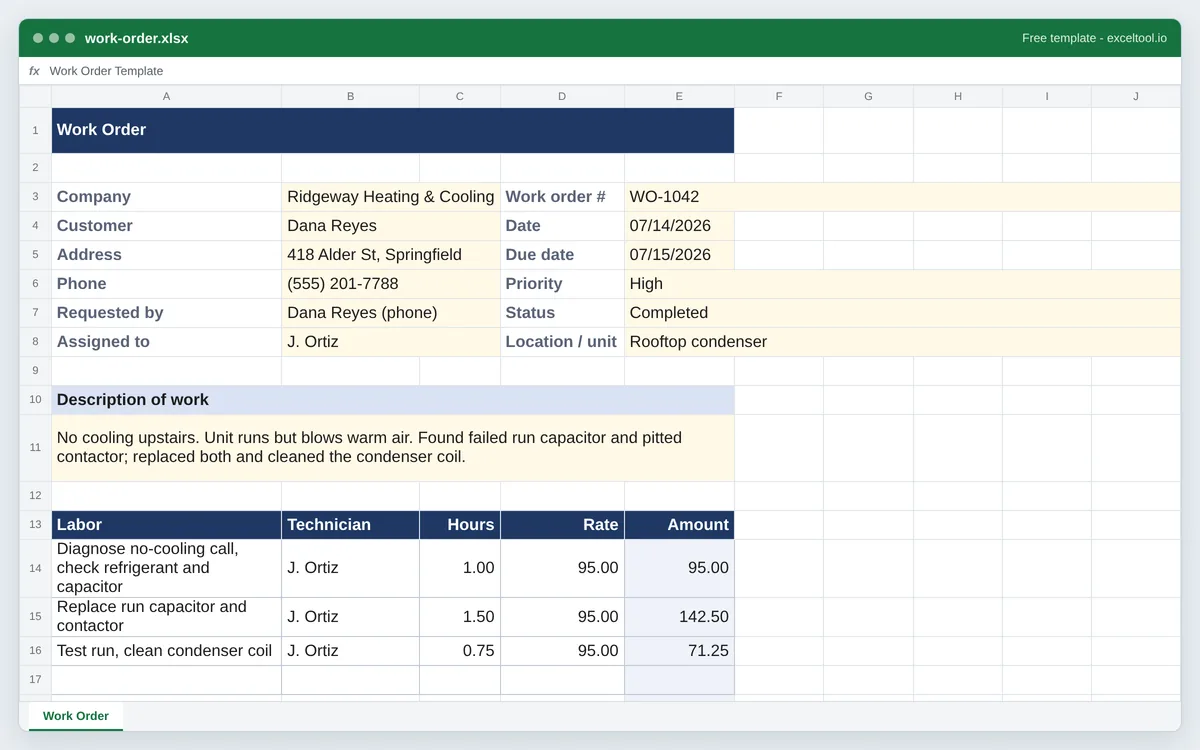
- Customer, job site, priority, status, requested-by and assigned-to fields at the top.
- A labor table that multiplies hours by rate and a parts table that multiplies quantity by unit cost.
- Labor and parts subtotals, tax on parts at your rate, and a grand total.
Pricing a finished job for the customer? The invoice template turns it into a bill.
Opens in Excel, Google Sheets, Numbers and LibreOfficeBuilt in your browser · nothing uploaded
Options
Shows how the sheet works. Type over them or delete them.
| A | B | C | D | E | |
|---|---|---|---|---|---|
| 1 | Work Order | ||||
| 2 | |||||
| 3 | Company | Ridgeway Heating & Cooling | Work order # | WO-1042 | |
| 4 | Customer | Dana Reyes | Date | 07/14/2026 | |
| 5 | Address | 418 Alder St, Springfield | Due date | 07/15/2026 | |
| 6 | Phone | (555) 201-7788 | Priority | High | |
| 7 | Requested by | Dana Reyes (phone) | Status | Completed | |
| 8 | Assigned to | J. Ortiz | Location / unit | Rooftop condenser | |
| 9 | |||||
| 10 | Description of work | ||||
| 11 | No cooling upstairs. Unit runs but blows warm air. Found failed run capacitor and pitted contactor; replaced both and cleaned the condenser coil. | ||||
| 12 | |||||
| 13 | Labor | Technician | Hours | Rate | Amount |
| 14 | Diagnose no-cooling call, check refrigerant and capacitor | J. Ortiz | 1.00 | 95.00 | =IF(COUNT(C14,D14)=2,ROUND(C14*D14,2),"") |
| 15 | Replace run capacitor and contactor | J. Ortiz | 1.50 | 95.00 | =IF(COUNT(C15,D15)=2,ROUND(C15*D15,2),"") |
| 16 | Test run, clean condenser coil | J. Ortiz | 0.75 | 95.00 | =IF(COUNT(C16,D16)=2,ROUND(C16*D16,2),"") |
| 17 | =IF(COUNT(C17,D17)=2,ROUND(C17*D17,2),"") | ||||
| 18 | Labor subtotal | =SUM(E14:E17) | |||
| 19 | |||||
| 20 | Part / material | Part # | Qty | Unit cost | Amount |
| 21 | Dual run capacitor 45/5 uF | CAP-4505 | 1 | 38.50 | =IF(COUNT(C21,D21)=2,ROUND(C21*D21,2),"") |
| 22 | Contactor 2-pole 30A | CON-230 | 1 | 27.90 | =IF(COUNT(C22,D22)=2,ROUND(C22*D22,2),"") |
Preview of the first 22 rows. Cells shown as =SUM(...) are live formulas in the downloaded workbook, not pasted numbers.
Built in your browser · nothing uploadedwork-order.xlsx · 1 sheetOpens in Excel, Google Sheets, Numbers and LibreOffice
What you get
- Customer, job site, priority, status, requested-by and assigned-to fields at the top.
- A labor table that multiplies hours by rate and a parts table that multiplies quantity by unit cost.
- Labor and parts subtotals, tax on parts at your rate, and a grand total.
- A sign-off block for the technician and the customer.
Other templates
About this template
A work order is the paper trail for one job: what the customer asked for, who was sent, what they did, how long it took and what parts went in. Maintenance teams use it to assign and close jobs, trades and field service businesses use it to bill, and property managers use it to show a tenant's request was handled.
This template fits on one US Letter page. The top block holds the work order number, dates, customer and site, priority and status (both are drop-downs). Below it is a box for the description of the work, then two tables that price themselves: labor lines multiply hours by rate, and parts lines multiply quantity by unit cost. Subtotals, tax on parts and the total sit underneath, and the page ends with signature lines for the technician and the customer.
Amounts stay blank until both numbers on a line are filled in, so an unfinished line never shows a misleading zero. Tax is applied to parts only, which is how most US states treat repair labor; change the tax formula if your state taxes labor too.
How to use it
- Set the size and download - Choose how many labor and parts lines you need on this page and download the Excel file or the printable PDF.
- Fill in the job - Work order number, dates, customer, address and phone, who asked for the work and who it is assigned to. Pick a priority and status from the drop-downs.
- Describe the work - Write what the customer reported and what needs doing in the description box. Technicians can add what they found.
- Log labor and parts - Enter each labor line with hours and rate, and each part with quantity and unit cost. Amounts, subtotals and the total update as you type.
- Close it out - Set the status to Completed, have the technician and customer sign, and save a copy or print it for your records.
Formulas in this workbook
Every formula below is written into the workbook itself, exactly as shown. The cell references are the ones the default options produce; change the row or column counts and they shift to match.
=IF(COUNT(C14,D14)=2,ROUND(C14*D14,2),"")- The Amount on each labor line: hours times rate, rounded to the cent. COUNT checks both cells hold numbers first, so the cell stays blank until the line is complete. Parts lines use the same formula for quantity times unit cost.=SUM(E14:E17)- Labor subtotal: adds the labor amounts. Blank amounts count as nothing. The parts subtotal does the same for the parts table.=ROUND(E30*E31,2)- Tax on parts: the parts subtotal times the tax rate you enter, rounded to the cent. Leave the rate at 0% if you don't charge sales tax.=E29+E30+E32- Total: labor plus parts plus tax.
Customizing it
- Add your logo above the title with Insert > Pictures, and put your company name in the Company field once and save the file as your blank form.
- If your state taxes repair labor, change the tax formula to use the labor subtotal plus the parts subtotal.
- Add a column to the labor table for the date of each visit if a job spans several days.
- Edit the Priority and Status choices under Data > Data Validation to match your own workflow.
Frequently Asked Questions
A unique work order number, the date, the customer and location, a description of the problem and the work, who it is assigned to, priority and status, the labor and parts used with costs, and a sign-off when the job is done.
No. A work order authorizes and records the job; an invoice asks for payment. Many small businesses turn a completed work order into the invoice, which is why this template prices labor and parts. This site has a separate invoice template if you want them apart.
Yes. Leave the labor and parts tables empty when the request comes in, use the description box for what the tenant or staff member reported, and fill in the rest when the job is done.
Yes. Upload the .xlsx to Google Drive and open it with Google Sheets. The formulas, drop-downs and print setup carry over.