Balance Sheet Template Excel - Business, Personal and Rental Property
A balance sheet with assets, liabilities and equity totalled by formula and a check that it balances. Business, personal net worth and rental property versions.
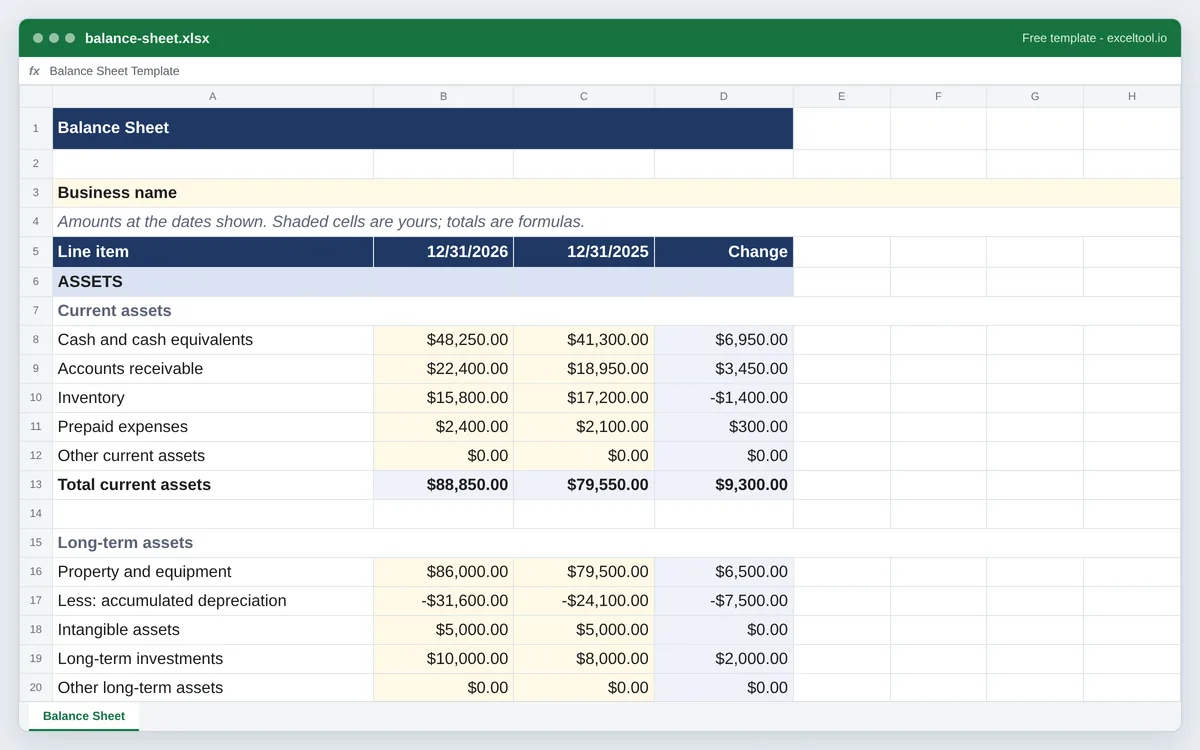
- Assets, liabilities and owner's equity in the standard order, each group with its subtotal and every total a formula.
- A balance check that shows Balanced when assets equal liabilities plus equity, or how far out it is.
- This year beside last year with the change, plus working capital, current ratio and debt-to-equity.
Opens in Excel, Google Sheets (File > Import), Apple Numbers and LibreOffice. Built in your browser; nothing is uploaded.
Business, personal net worth and rental property versions: choose one in the options below.
| A | B | C | D | |
|---|---|---|---|---|
| 1 | Balance Sheet | |||
| 2 | ||||
| 3 | Business name | |||
| 4 | Amounts at the dates shown. Shaded cells are yours; totals are formulas. | |||
| 5 | Line item | 46387 | 46022 | Change |
| 6 | ASSETS | |||
| 7 | Current assets | |||
| 8 | Cash and cash equivalents | 48250 | 41300 | =B8-C8 |
| 9 | Accounts receivable | 22400 | 18950 | =B9-C9 |
| 10 | Inventory | 15800 | 17200 | =B10-C10 |
| 11 | Prepaid expenses | 2400 | 2100 | =B11-C11 |
| 12 | Other current assets | 0 | 0 | =B12-C12 |
| 13 | Total current assets | =SUM(B8:B12) | =SUM(C8:C12) | =B13-C13 |
| 14 | ||||
| 15 | Long-term assets | |||
| 16 | Property and equipment | 86000 | 79500 | =B16-C16 |
| 17 | Less: accumulated depreciation | -31600 | -24100 | =B17-C17 |
| 18 | Intangible assets | 5000 | 5000 | =B18-C18 |
| 19 | Long-term investments | 10000 | 8000 | =B19-C19 |
| 20 | Other long-term assets | 0 | 0 | =B20-C20 |
| 21 | Total long-term assets | =SUM(B16:B20) | =SUM(C16:C20) | =B21-C21 |
| 22 | TOTAL ASSETS | =B13+B21 | =C13+C21 | =B22-C22 |
Preview of the first 22 rows. Cells shown as =SUM(...) are live formulas in the downloaded workbook, not pasted numbers.
What you get
- •Assets, liabilities and owner's equity in the standard order, each group with its subtotal and every total a formula.
- •A balance check that shows Balanced when assets equal liabilities plus equity, or how far out it is.
- •This year beside last year with the change, plus working capital, current ratio and debt-to-equity.
- •Personal net worth and rental property versions: the rental one has a column per property and a total.
Other templates
About this template
A balance sheet is a snapshot of what an entity owns and owes on one date. Assets are listed first - cash, receivables, inventory, equipment - then liabilities - bills, loans, taxes owed - and the difference is equity: what would be left for the owners if everything were sold and every debt paid. Because equity is defined as that difference, a correct balance sheet always balances: assets equal liabilities plus equity.
This template comes in three versions. The business version is the classic small business balance sheet with current and long-term sections and owner's equity, comparing this year-end with last year's. The personal version is a net worth statement - bank accounts, investments, retirement accounts, home and cars against the mortgage, car loans, student loans and credit cards. The rental property version puts each property in its own column with a total, the way lenders and partners ask to see a landlord's position.
Every subtotal and total is a SUM, and the balance check compares total assets with total liabilities and equity: it reads Balanced, or says how much the sheet is off by, which is the fastest way to catch a figure typed into the wrong line. The business version adds working capital, the current ratio and debt-to-equity under the statement.
The example figures are there to show the shape - replace them with yours. A balance sheet is usually prepared at the end of the year (December 31 for most US small businesses) and goes with the profit and loss statement for the same period.
How to use it
- Choose the version and the dates - Business, personal or rental property on this page. The column headings are year-end dates; type over them for a different date, such as a quarter end or the date a loan application asks for.
- Fill in assets - Use balances on the statement date: the bank balance, what customers owe you, inventory at cost, and equipment at cost with accumulated depreciation entered as a negative number on its own line.
- Fill in liabilities - Everything owed on that date: unpaid bills, credit lines, the part of long-term loans due within twelve months under current liabilities, and the rest of the loan balance under long-term.
- Fill in equity and check the balance - Owner's capital and retained earnings. If the check row says the sheet is off, the difference is usually an asset or liability on the wrong date or a missing loan; for a sole proprietor, retained earnings is often the balancing figure.
- Rename or add lines - Line names are plain text. To add a line, insert a row inside a group - between its first and last item - and the subtotal SUM stretches to include it.
Formulas in this workbook
Every formula below is written into the workbook itself, exactly as shown. The cell references are the ones the default options produce; change the row or column counts and they shift to match.
=SUM(B8:B12)- A group subtotal - here total current assets in B13 - adding the items above it. Every group has one.=B13+B21- Total assets: the current and long-term subtotals added. Total liabilities is built the same way, and total equity is the SUM of its lines.=B38+B44- Total liabilities and equity, which must equal total assets.=IF(ROUND(B22-B46,2)=0,"Balanced","Off by "&TEXT(B22-B46,"#,##0.00"))- The balance check: compares total assets with total liabilities and equity, rounded to the cent so floating-point dust does not count as an error.=B8-C8- The Change column: this year minus last year for each line.=IFERROR(B13/B32,"")- Current ratio: current assets divided by current liabilities. Above 1 means short-term debts are covered by short-term assets.=B13-B32- Working capital: current assets minus current liabilities.=IFERROR(B38/B44,"")- Debt-to-equity: total liabilities divided by owner's equity.
Customising it
- Add a quarter-end column by inserting a column before the prior year and copying the formulas across from the current year.
- For an S corporation or LLC with several owners, split Owner's capital into one line per owner or member.
- Link Retained earnings to your profit and loss statement: last year's retained earnings plus this year's net income less owner draws.
- For a personal financial statement for a bank, add a Notes column describing each asset (account numbers, property addresses) and sign and date the bottom.
Frequently Asked Questions
Assets (cash, accounts receivable, inventory, prepaid expenses, equipment less depreciation), liabilities (accounts payable, accrued expenses, credit lines, sales tax and payroll taxes owed, loans) and owner's equity (capital invested and retained earnings). The template lists each in that order with subtotals.
Usually because a figure is from a different date, a loan or credit card is missing, or depreciation was entered as a positive number. The check row shows the difference; if it matches a single figure on the sheet, that line is the likely culprit.
Choose the personal version. List what you own at today's value - bank and brokerage accounts, retirement accounts, your home and car - and what you owe on each debt. Net worth is assets minus liabilities, and comparing two years shows whether it is growing.
A balance sheet for a landlord's properties: each property's cash, deposits held, the property at cost less depreciation, against the mortgage and amounts owed, with the owner's equity in each. The rental version gives each property its own column and a total column.