Printable Check Register Template
A checkbook register with a running balance, a cleared column and a bank reconciliation block. Print it on US Letter or keep it in Excel.
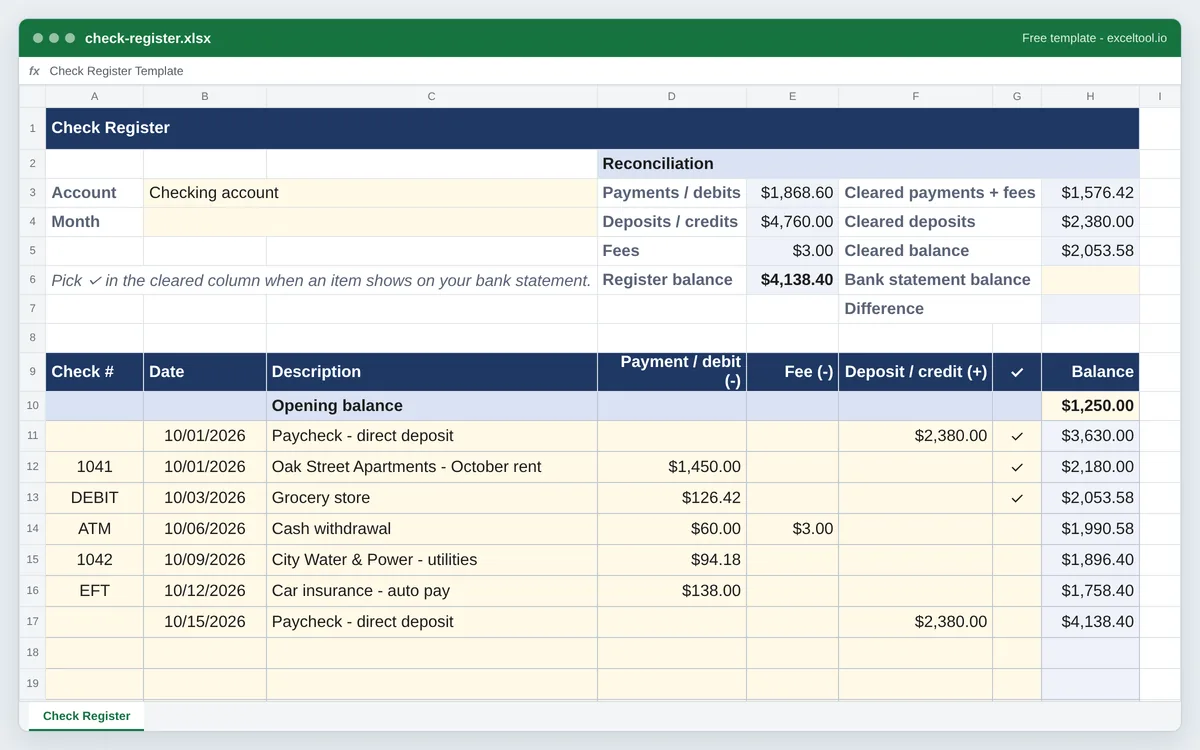
- Check number, date, description, payment, fee, deposit and a cleared column, like the register in a checkbook.
- A running balance worked out from the opening balance on every row, so skipped lines never break it.
- A reconciliation block: cleared balance against your bank statement balance, with the difference.
Opens in Excel, Google Sheets (File > Import), Apple Numbers and LibreOffice. Built in your browser; nothing is uploaded.
The PDF is a blank register with ruled lines and the headings on every page - print as many pages as you need.
| A | B | C | D | E | F | G | H | I | |
|---|---|---|---|---|---|---|---|---|---|
| 1 | Check Register | ||||||||
| 2 | Reconciliation | ||||||||
| 3 | Account | Checking account | Payments / debits | =SUM($D$11:$D$60) | Cleared payments + fees | =SUMIF($G$11:$G$60,"✓",$D$11:$D$60)+SUMIF($G$11:$G$60,"✓",$E$11:$E$60) | |||
| 4 | Month | Deposits / credits | =SUM($F$11:$F$60) | Cleared deposits | =SUMIF($G$11:$G$60,"✓",$F$11:$F$60) | ||||
| 5 | Fees | =SUM($E$11:$E$60) | Cleared balance | =H10+H4-H3 | |||||
| 6 | Pick ✓ in the cleared column when an item shows on your bank statement. | Register balance | =H10+E4-E3-E5 | Bank statement balance | |||||
| 7 | Difference | =IF(H6="","",H6-H5) | |||||||
| 8 | |||||||||
| 9 | Check # | Date | Description | Payment / debit (-) | Fee (-) | Deposit / credit (+) | ✓ | Balance | |
| 10 | Opening balance | 1250 | |||||||
| 11 | 46296 | Paycheck - direct deposit | 2380 | ✓ | =IF(COUNT(D11:F11)=0,"",$H$10+SUM($F$11:F11)-SUM($D$11:D11)-SUM($E$11:E11)) | ||||
| 12 | 1041 | 46296 | Oak Street Apartments - October rent | 1450 | ✓ | =IF(COUNT(D12:F12)=0,"",$H$10+SUM($F$11:F12)-SUM($D$11:D12)-SUM($E$11:E12)) | |||
| 13 | DEBIT | 46298 | Grocery store | 126.42 | ✓ | =IF(COUNT(D13:F13)=0,"",$H$10+SUM($F$11:F13)-SUM($D$11:D13)-SUM($E$11:E13)) | |||
| 14 | ATM | 46301 | Cash withdrawal | 60 | 3 | =IF(COUNT(D14:F14)=0,"",$H$10+SUM($F$11:F14)-SUM($D$11:D14)-SUM($E$11:E14)) | |||
| 15 | 1042 | 46304 | City Water & Power - utilities | 94.18 | =IF(COUNT(D15:F15)=0,"",$H$10+SUM($F$11:F15)-SUM($D$11:D15)-SUM($E$11:E15)) | ||||
| 16 | EFT | 46307 | Car insurance - auto pay | 138 | =IF(COUNT(D16:F16)=0,"",$H$10+SUM($F$11:F16)-SUM($D$11:D16)-SUM($E$11:E16)) | ||||
| 17 | 46310 | Paycheck - direct deposit | 2380 | =IF(COUNT(D17:F17)=0,"",$H$10+SUM($F$11:F17)-SUM($D$11:D17)-SUM($E$11:E17)) | |||||
| 18 | =IF(COUNT(D18:F18)=0,"",$H$10+SUM($F$11:F18)-SUM($D$11:D18)-SUM($E$11:E18)) | ||||||||
| 19 | =IF(COUNT(D19:F19)=0,"",$H$10+SUM($F$11:F19)-SUM($D$11:D19)-SUM($E$11:E19)) | ||||||||
| 20 | =IF(COUNT(D20:F20)=0,"",$H$10+SUM($F$11:F20)-SUM($D$11:D20)-SUM($E$11:E20)) | ||||||||
| 21 | =IF(COUNT(D21:F21)=0,"",$H$10+SUM($F$11:F21)-SUM($D$11:D21)-SUM($E$11:E21)) | ||||||||
| 22 | =IF(COUNT(D22:F22)=0,"",$H$10+SUM($F$11:F22)-SUM($D$11:D22)-SUM($E$11:E22)) |
Preview of the first 22 rows. Cells shown as =SUM(...) are live formulas in the downloaded workbook, not pasted numbers.
What you get
- •Check number, date, description, payment, fee, deposit and a cleared column, like the register in a checkbook.
- •A running balance worked out from the opening balance on every row, so skipped lines never break it.
- •A reconciliation block: cleared balance against your bank statement balance, with the difference.
- •A printable US Letter PDF with ruled lines for writing by hand.
Other templates
About this template
A check register is the running record of a checking account kept by the account holder rather than the bank: every check written, debit-card purchase, ATM withdrawal, fee and deposit, with the balance after each one. Banks stopped printing them in every checkbook, but the reason for keeping one has not changed - the bank's balance does not know about the check you mailed yesterday, and an overdraft fee costs more than the time it takes to write a line.
This template comes two ways. The PDF is a printable US Letter register with ruled lines to fill in by pen, the way the booklet in a checkbook works. The Excel workbook does the arithmetic: type the amounts and the balance column keeps itself current, and the cleared column feeds a reconciliation block so you can match the register to the monthly bank statement.
Layout: the account name and the reconciliation block sit at the top. Row 9 is the header - Check #, Date, Description, Payment / debit, Fee, Deposit / credit, a check mark column for cleared items, and Balance. Row 10 holds the opening balance, and the transaction lines follow.
Every balance is the opening balance plus all deposits so far, minus all payments and fees so far. It does not read the line above, so a blank line or a deleted row in the middle of the month never turns the rest of the column into errors.
How to use it
- Enter the opening balance - Type the balance you are starting from into the Balance cell on the Opening balance line (row 10). Use the balance on your last bank statement if you are starting fresh.
- Write one line per transaction - Check number (or DEBIT, ATM, EFT for electronic items), date and description, then the amount in Payment / debit or Deposit / credit. Bank fees go in the Fee column so they stand out when you review the month.
- Mark items as they clear - When a transaction appears on your bank statement, pick the check mark in its cleared column. Cleared items feed the reconciliation block; uncleared ones are the checks still in the mail.
- Reconcile at month end - Type the ending balance from the statement into Bank statement balance. The Difference cell should be zero; if it is not, look for a missing fee, a typo in an amount, or an item you forgot to mark as cleared.
- Printing a paper register - Download the PDF for a blank register on US Letter paper with ruled lines and the header repeated on every page. The Excel version prints the same way: the page setup is already US Letter, fitted to the page width.
Formulas in this workbook
Every formula below is written into the workbook itself, exactly as shown. The cell references are the ones the default options produce; change the row or column counts and they shift to match.
=IF(COUNT(D11:F11)=0,"",$H$10+SUM($F$11:F11)-SUM($D$11:D11)-SUM($E$11:E11))- The running balance on the first transaction line: the opening balance in H10, plus every deposit so far, minus every payment and fee so far. The ranges grow by one row each line down. The IF leaves unused lines blank instead of repeating the balance.=SUMIF($G$11:$G$60,"✓",$F$11:$F$60)- Cleared deposits: adds the Deposit / credit column only on rows marked with a check. Payments and fees are added up the same way for the cleared balance.=SUM($F$11:$F$60)- Total deposits in the register, cleared or not. Payments and fees have matching totals in the block above the table.=H10+E4-E3-E5- Register balance: opening balance plus deposits minus payments and fees.=H10+H4-H3- Cleared balance: the opening balance plus cleared deposits minus cleared payments and fees. This is what the bank statement should show.=IF(H6="","",H6-H5)- Difference between the bank statement balance you type in H6 and the cleared balance. Zero means the register is reconciled.
Customising it
- Add a Category column next to Description and use a PivotTable or SUMIF to see what each month's spending went on.
- Keep a year in one workbook by copying the sheet for each month and linking each month's opening balance to the previous sheet's register balance.
- Track a savings account or credit card in the same layout: for a card, payments to the card go in Deposit / credit and purchases in Payment / debit.
- Change the cleared mark by editing the data validation list (Data > Data Validation) and the two SUMIF criteria in the reconciliation block.
Frequently Asked Questions
Mark every transaction that appears on your bank statement as cleared, then type the statement's ending balance into the reconciliation block. The cleared balance (opening balance plus cleared deposits minus cleared payments and fees) should match it; the Difference cell shows any gap to track down.
Yes - the PDF download is a blank register on US Letter paper with ruled lines and the column headers repeated on every page, ready to print and keep with your checkbook.
Each balance is calculated from the opening balance and the running totals, and a line with no amounts returns blank so the printout is not filled with repeated balances. Type an amount and that line's balance appears.
Anything that tells you how the money left: DEBIT for card purchases, ATM for cash withdrawals, EFT or ACH for automatic payments, and the check number for paper checks. The column is text, so any label works.