Receipt Template - Sales, Payment and Rent Receipts
A printable receipt with your business details, line items that total themselves, sales tax, payment method and amount paid.
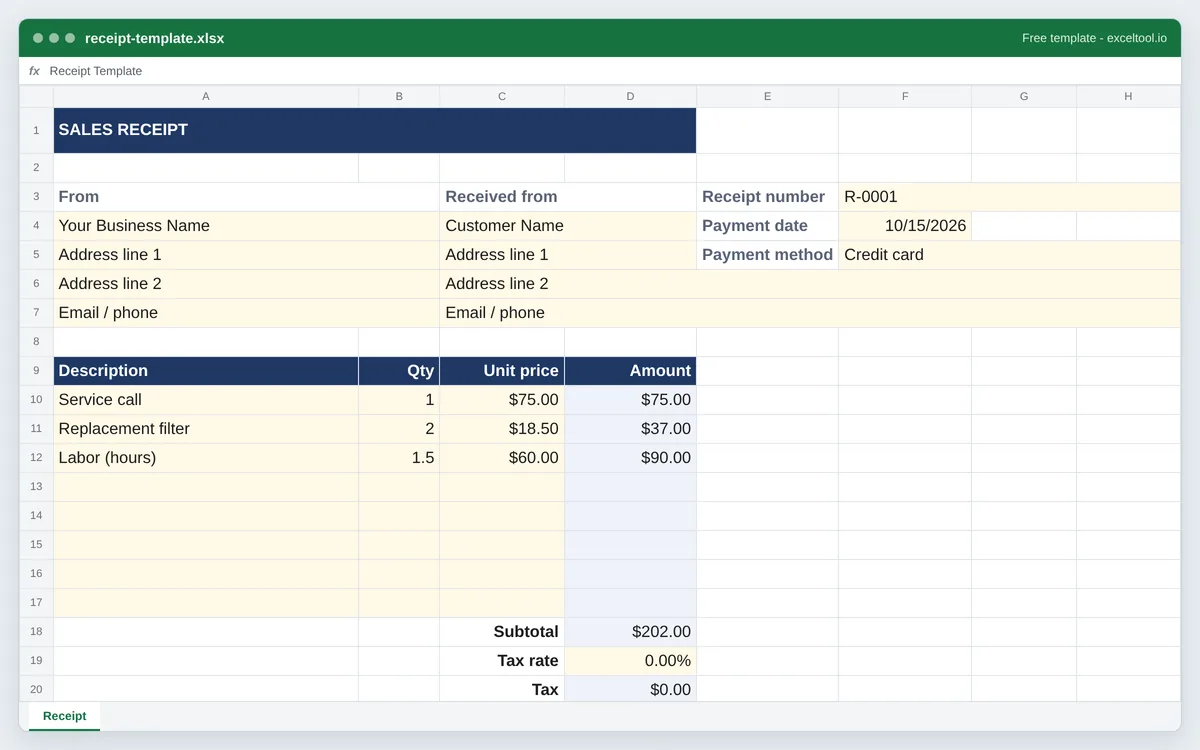
- Your business details, the customer, a receipt number, payment date and payment method.
- Line items where Amount is quantity times unit price, a subtotal and an editable sales tax rate.
- Amount paid and balance due under the total, for part payments and deposits.
Opens in Excel, Google Sheets (File > Import), Apple Numbers and LibreOffice. Built in your browser; nothing is uploaded.
Sales, payment and rent receipt versions in the options below. The PDF is a blank receipt to fill in by hand.
| A | B | C | D | E | F | G | H | |
|---|---|---|---|---|---|---|---|---|
| 1 | SALES RECEIPT | |||||||
| 2 | ||||||||
| 3 | From | Received from | Receipt number | R-0001 | ||||
| 4 | Your Business Name | Customer Name | Payment date | 46310 | ||||
| 5 | Address line 1 | Address line 1 | Payment method | Credit card | ||||
| 6 | Address line 2 | Address line 2 | ||||||
| 7 | Email / phone | Email / phone | ||||||
| 8 | ||||||||
| 9 | Description | Qty | Unit price | Amount | ||||
| 10 | Service call | 1 | 75 | =IF(COUNT(B10,C10)=2,B10*C10,"") | ||||
| 11 | Replacement filter | 2 | 18.5 | =IF(COUNT(B11,C11)=2,B11*C11,"") | ||||
| 12 | Labor (hours) | 1.5 | 60 | =IF(COUNT(B12,C12)=2,B12*C12,"") | ||||
| 13 | =IF(COUNT(B13,C13)=2,B13*C13,"") | |||||||
| 14 | =IF(COUNT(B14,C14)=2,B14*C14,"") | |||||||
| 15 | =IF(COUNT(B15,C15)=2,B15*C15,"") | |||||||
| 16 | =IF(COUNT(B16,C16)=2,B16*C16,"") | |||||||
| 17 | =IF(COUNT(B17,C17)=2,B17*C17,"") | |||||||
| 18 | Subtotal | =SUM(D10:D17) | ||||||
| 19 | Tax rate | 0 | ||||||
| 20 | Tax | =D18*D19 | ||||||
| 21 | Total | =D18+D20 | ||||||
| 22 | Amount paid | =D21 |
Preview of the first 22 rows. Cells shown as =SUM(...) are live formulas in the downloaded workbook, not pasted numbers.
What you get
- •Your business details, the customer, a receipt number, payment date and payment method.
- •Line items where Amount is quantity times unit price, a subtotal and an editable sales tax rate.
- •Amount paid and balance due under the total, for part payments and deposits.
- •Sales, payment and rent versions, and a blank printable PDF for handwritten receipts.
Other templates
About this template
A receipt is the customer's proof that they paid: who was paid, by whom, when, for what and how much. Businesses give one for a cash sale, a payment on account, a deposit or a month's rent, and the customer keeps it for returns, warranty claims, expense reports and taxes. Unlike an invoice, which asks for money, a receipt records money already received - so this template keeps the invoice's arithmetic and adds the payment details.
Three versions share one layout. The sales receipt lists items or services with quantity and unit price. The payment receipt records a payment against an invoice or account. The rent receipt is for landlords - several states require one when rent is paid in cash, and tenants often need them as proof of payment. All three show the payment method and an Amount paid line, so a deposit or part payment shows the balance still due.
The layout follows the invoice template on this site: the receipt type across the top, your details in column A, the customer's under Received from, and the receipt number, payment date and payment method on the right. Line items start in row 10; Subtotal, Tax rate, Tax, Total, Amount paid and Balance due stack under the Amount column, with a notes box below for the thank-you, return policy or signature.
Sales tax in the US is set by state and often by county and city, so the tax rate is a cell you set rather than a built-in figure; leave it at 0% for untaxed services.
How to use it
- Pick the receipt type and fill in your details - Sales, payment or rent on this page. In the workbook, your business name and address go in column A and the customer's under Received from.
- Number and date it - The receipt number sits at the top right; keep numbers sequential so each payment can be traced. The payment date is a date cell, and Payment method holds cash, check number, card or transfer.
- List what was paid for - Description, quantity and unit price on each line. Amount fills itself in once quantity and price are both entered, and the subtotal adds every line.
- Set sales tax and check the payment - Type your combined sales tax rate into the Tax rate cell. Amount paid equals the total by default; overwrite it for a deposit or part payment and Balance due shows what is left.
- Print or send it - Print on US Letter or save as PDF to email. For handwritten receipts, download the blank printable PDF instead.
Formulas in this workbook
Every formula below is written into the workbook itself, exactly as shown. The cell references are the ones the default options produce; change the row or column counts and they shift to match.
=IF(COUNT(B10,C10)=2,B10*C10,"")- Line amount: quantity times unit price, blank until both are entered.=SUM(D10:D17)- Subtotal of the line items.=D18*D19- Sales tax: subtotal times the tax rate in the cell above.=D18+D20- Total: subtotal plus tax.=D21- Amount paid starts equal to the total; type over it for a part payment or deposit.=D21-D22- Balance due: the total minus the amount paid - zero for a receipt paid in full.
Customising it
- Make a receipt book: copy the sheet for each receipt and change the number, or keep one sheet and save each as a PDF.
- Add your logo with Insert > Pictures over the banner row.
- For a cash-only business, delete the tax rows if you do not collect sales tax; the Total then equals the subtotal.
- Add a Signature line in the notes box for receipts that must be signed, such as rent paid in cash.
Frequently Asked Questions
The business name and contact details, the customer's name, a receipt number, the date, what was paid for, the amount, any tax, the total and how it was paid. This template has a cell for each.
An invoice asks for payment; a receipt confirms payment was received. Many businesses send an invoice first and a receipt once the money arrives - this template's Amount paid and Balance due lines cover a payment that only settles part of an invoice.
In several US states landlords must give a receipt when rent is paid in cash, and it is good practice for any payment method. The rent receipt version records the period, unit, amount and method, with a line for the landlord's signature.
Yes - the PDF download is a blank receipt on US Letter paper with ruled line items, ready to fill in by hand.