Attendance Sheet Template - Monthly Attendance Tracker
A monthly attendance sheet for a class, team or group: a column per day, P/A/T/E codes from a drop-down, and totals and attendance rates by formula.
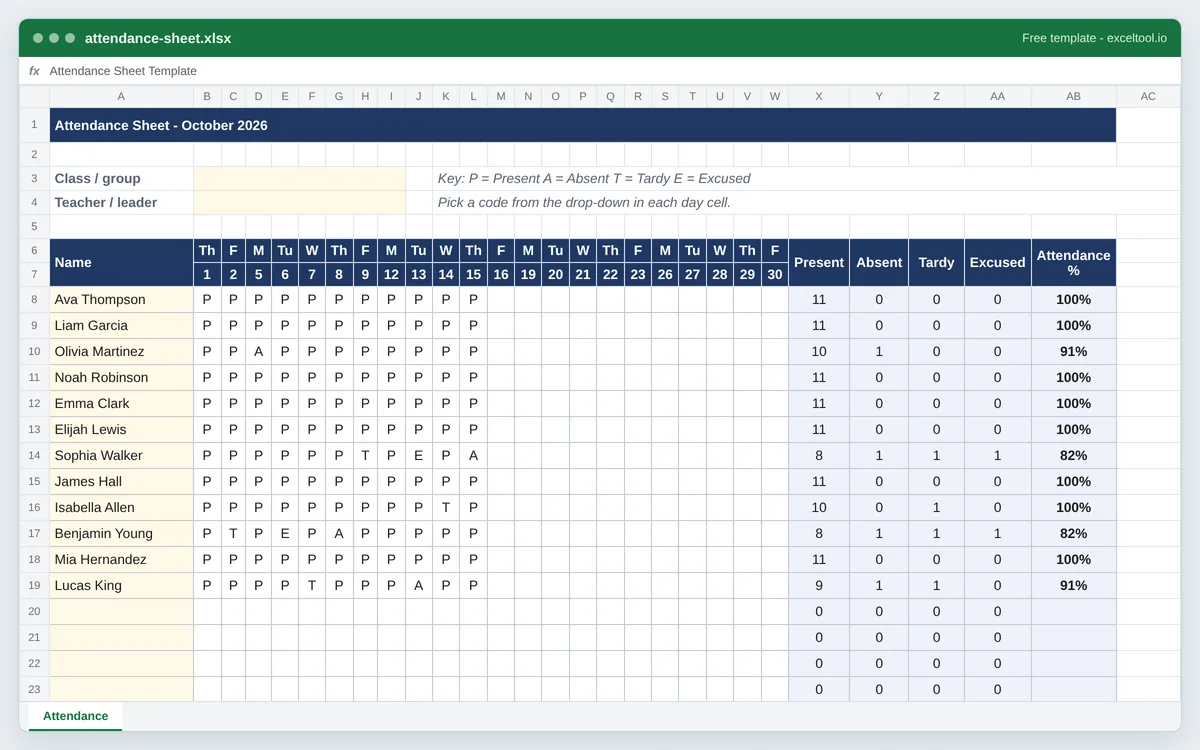
- One row per student or employee and one column per day of the month - weekdays only, or every day.
- A drop-down of P (present), A (absent), T (tardy) and E (excused) on every day cell, color-coded.
- Totals of each code and an attendance rate per person, and a present count for every day.
Opens in Excel, Google Sheets (File > Import), Apple Numbers and LibreOffice. Built in your browser; nothing is uploaded.
Pick the month and year below and the date columns are built for it. Collecting names at a one-off event instead? Use the sign-in sheet template.
| A | B | C | D | E | F | G | H | I | |
|---|---|---|---|---|---|---|---|---|---|
| 1 | Attendance Sheet - October 2026 | ||||||||
| 2 | |||||||||
| 3 | Class / group | ||||||||
| 4 | Teacher / leader | ||||||||
| 5 | |||||||||
| 6 | Name | Th | F | M | Tu | W | Th | F | M |
| 7 | 1 | 2 | 5 | 6 | 7 | 8 | 9 | 12 | |
| 8 | Ava Thompson | P | P | P | P | P | P | P | P |
| 9 | Liam Garcia | P | P | P | P | P | P | P | P |
| 10 | Olivia Martinez | P | P | A | P | P | P | P | P |
| 11 | Noah Robinson | P | P | P | P | P | P | P | P |
| 12 | Emma Clark | P | P | P | P | P | P | P | P |
| 13 | Elijah Lewis | P | P | P | P | P | P | P | P |
| 14 | Sophia Walker | P | P | P | P | P | P | T | P |
| 15 | James Hall | P | P | P | P | P | P | P | P |
| 16 | Isabella Allen | P | P | P | P | P | P | P | P |
| 17 | Benjamin Young | P | T | P | E | P | A | P | P |
| 18 | Mia Hernandez | P | P | P | P | P | P | P | P |
| 19 | Lucas King | P | P | P | P | T | P | P | P |
| 20 | |||||||||
| 21 | |||||||||
| 22 |
Preview of the first 22 rows. Cells shown as =SUM(...) are live formulas in the downloaded workbook, not pasted numbers.
What you get
- •One row per student or employee and one column per day of the month - weekdays only, or every day.
- •A drop-down of P (present), A (absent), T (tardy) and E (excused) on every day cell, color-coded.
- •Totals of each code and an attendance rate per person, and a present count for every day.
- •Month, year and weekday headings generated for the month you choose, plus a printable landscape PDF.
Other templates
About this template
An attendance sheet is a grid of people against days with a mark in every cell. Teachers keep one per class, coaches per team, managers per shift crew, churches and clubs per group - and at the end of the month somebody has to count the marks. This template counts them: every row totals its own present, absent, tardy and excused days and works out an attendance rate, and every day column counts how many people were there.
Choose the month and year and the sheet builds the calendar: one column per school day (weekdays only) or per calendar day, each headed with its date and weekday. Each day cell has a drop-down with four codes - P for present, A for absent, T for tardy, E for excused - and absences, tardies and excused days are color-coded so a pattern stands out at a glance.
Layout: the class or group name and the teacher or leader in rows 3 and 4 with the code key beside them; two header rows for weekday and date; then one row per person with the summary columns Present, Absent, Tardy, Excused and Attendance % at the right. The bottom row counts who was present (including tardy) each day.
Attendance % is days present (counting tardy as present) divided by days marked, so a student who joins mid-month is not penalized for days before they arrived. Schools often have their own rule for tardies and excused absences; the formula is easy to change.
How to use it
- Choose the month and enter names - Pick the month and year on this page and paste your roster (one name per line), or type names into column A after downloading.
- Mark each day - Click a day cell and choose P, A, T or E from the drop-down - or just type the letter. Leave days blank before someone joined or after they left.
- Read the totals - Each row counts its codes and shows the attendance rate. The bottom row shows how many were present each day.
- Start a new month - Generate the next month here, or copy the sheet in Excel and clear the day cells (the dates in the header come from the month you chose, so regenerate rather than retype them).
- Print it for the clipboard - The PDF is a blank monthly attendance sheet in landscape on US Letter; the Excel version prints the same way.
Formulas in this workbook
Every formula below is written into the workbook itself, exactly as shown. The cell references are the ones the default options produce; change the row or column counts and they shift to match.
=COUNTIF(B8:W8,"P")- Days present for the first person; Absent, Tardy and Excused use the same COUNTIF with A, T and E.=IF(SUM(X8:AA8)=0,"",(X8+Z8)/SUM(X8:AA8))- Attendance %: present plus tardy, divided by all marked days. Blank until something is marked.=COUNTIF(B8:B32,"P")+COUNTIF(B8:B32,"T")- Present on the day, counting tardy arrivals as present.
Customising it
- Add codes such as H (half day) or R (remote) by editing the drop-down list under Data > Data Validation and adding a COUNTIF column for each.
- Count tardy as absent instead of present by removing the tardy term from the Attendance % formula.
- Keep a school year in one workbook: generate each month and move the sheets into one file, then add a Year sheet that sums each person's monthly totals.
- For an employee attendance tracker, add codes for V (vacation) and S (sick) and use the totals for PTO tracking.
Frequently Asked Questions
Put names down column A, a column for each day of the month across the top, and use a code in each cell. Then COUNTIF counts each code per person. This template builds the date columns for the month you choose and adds the drop-down, colors and totals.
Present, Absent, Tardy (late) and Excused (an absence with a valid reason). The drop-down limits each cell to these four so the totals stay accurate; change the list if your school uses different codes.
Present plus tardy days, divided by every day that has a mark. Excused absences count as marked days that were missed; if your policy excludes them, remove E from the denominator.
Yes - the PDF download is a blank monthly sheet in landscape on US Letter with a box for every weekday, ready for a clipboard. In Excel, generate the month you need and print.