Invoice Tracker Template with Aging Report
Track every invoice you send: due dates, payments, status and days overdue update themselves, with an aging summary of what is outstanding.
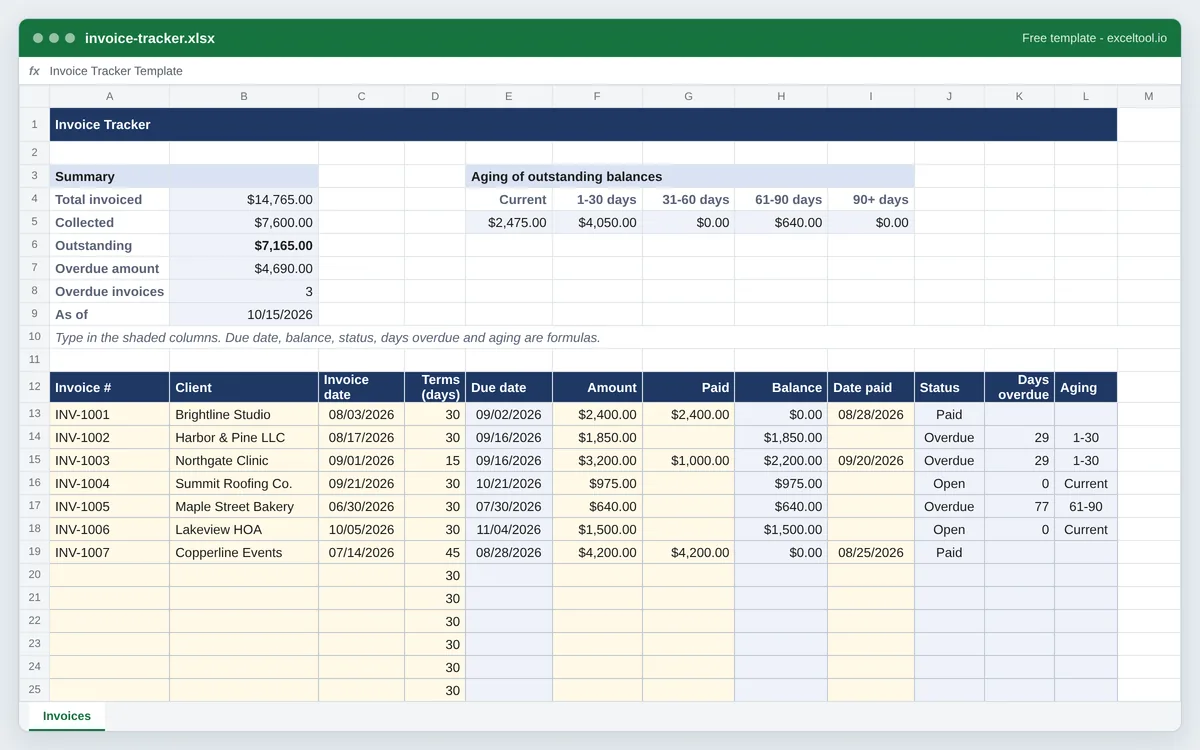
- One row per invoice: client, invoice date, payment terms, amount and payments, with the due date and balance calculated.
- Status (Paid, Partial, Open, Overdue) and days overdue worked out against today's date every time the file opens.
- An aging summary in the standard buckets - current, 1-30, 31-60, 61-90 and over 90 days.
Opens in Excel, Google Sheets (File > Import), Apple Numbers and LibreOffice. Built in your browser; nothing is uploaded.
| A | B | C | D | E | F | G | H | I | |
|---|---|---|---|---|---|---|---|---|---|
| 1 | Invoice Tracker | ||||||||
| 2 | |||||||||
| 3 | Summary | Aging of outstanding balances | |||||||
| 4 | Total invoiced | =SUM($F$13:$F$62) | Current | 1-30 days | 31-60 days | 61-90 days | 90+ days | ||
| 5 | Collected | =SUM($G$13:$G$62) | =SUMIF($L$13:$L$62,"Current",$H$13:$H$62) | =SUMIF($L$13:$L$62,"1-30",$H$13:$H$62) | =SUMIF($L$13:$L$62,"31-60",$H$13:$H$62) | =SUMIF($L$13:$L$62,"61-90",$H$13:$H$62) | =SUMIF($L$13:$L$62,"90+",$H$13:$H$62) | ||
| 6 | Outstanding | =SUM($H$13:$H$62) | |||||||
| 7 | Overdue amount | =SUMIF($J$13:$J$62,"Overdue",$H$13:$H$62) | |||||||
| 8 | Overdue invoices | =COUNTIF($J$13:$J$62,"Overdue") | |||||||
| 9 | As of | =TODAY() | |||||||
| 10 | Type in the shaded columns. Due date, balance, status, days overdue and aging are formulas. | ||||||||
| 11 | |||||||||
| 12 | Invoice # | Client | Invoice date | Terms (days) | Due date | Amount | Paid | Balance | Date paid |
| 13 | INV-1001 | Brightline Studio | 46237 | 30 | =IF(C13="","",C13+D13) | 2400 | 2400 | =IF(A13="","",F13-N(G13)) | 46262 |
| 14 | INV-1002 | Harbor & Pine LLC | 46251 | 30 | =IF(C14="","",C14+D14) | 1850 | =IF(A14="","",F14-N(G14)) | ||
| 15 | INV-1003 | Northgate Clinic | 46266 | 15 | =IF(C15="","",C15+D15) | 3200 | 1000 | =IF(A15="","",F15-N(G15)) | 46285 |
| 16 | INV-1004 | Summit Roofing Co. | 46286 | 30 | =IF(C16="","",C16+D16) | 975 | =IF(A16="","",F16-N(G16)) | ||
| 17 | INV-1005 | Maple Street Bakery | 46203 | 30 | =IF(C17="","",C17+D17) | 640 | =IF(A17="","",F17-N(G17)) | ||
| 18 | INV-1006 | Lakeview HOA | 46300 | 30 | =IF(C18="","",C18+D18) | 1500 | =IF(A18="","",F18-N(G18)) | ||
| 19 | INV-1007 | Copperline Events | 46217 | 45 | =IF(C19="","",C19+D19) | 4200 | 4200 | =IF(A19="","",F19-N(G19)) | 46259 |
| 20 | 30 | =IF(C20="","",C20+D20) | =IF(A20="","",F20-N(G20)) | ||||||
| 21 | 30 | =IF(C21="","",C21+D21) | =IF(A21="","",F21-N(G21)) | ||||||
| 22 | 30 | =IF(C22="","",C22+D22) | =IF(A22="","",F22-N(G22)) |
Preview of the first 22 rows. Cells shown as =SUM(...) are live formulas in the downloaded workbook, not pasted numbers.
What you get
- •One row per invoice: client, invoice date, payment terms, amount and payments, with the due date and balance calculated.
- •Status (Paid, Partial, Open, Overdue) and days overdue worked out against today's date every time the file opens.
- •An aging summary in the standard buckets - current, 1-30, 31-60, 61-90 and over 90 days.
- •Overdue rows turn red and paid rows green, so the ones to chase stand out.
Other templates
About this template
An invoice tracker is the list behind the invoices: what was billed, to whom, when it is due and whether it has been paid. Accounting software keeps one automatically, but a freelancer or small business sending a handful of invoices a month often has the invoices themselves in a folder and no single place that says who still owes what. This workbook is that place.
Each row is one invoice. You type the number, client, invoice date, payment terms in days, the amount and anything paid so far; the sheet works out the due date, the balance, a status, how many days it is overdue and which aging bucket it falls in. Because status and days overdue are calculated against TODAY(), opening the file next week moves an open invoice into Overdue without anyone touching it.
Layout: the summary block sits in rows 3 to 9 - totals invoiced, collected and outstanding, the overdue amount and count, and the aging buckets. Row 12 is the table header: Invoice #, Client, Invoice date, Terms (days), Due date, Amount, Paid, Balance, Date paid, Status, Days overdue and Aging.
Net 30 is the usual US default for business-to-business invoices, but the Terms column is per invoice, so a net 15 client and a net 45 client sit side by side. Payments can be partial: an invoice with money received but a balance left shows as Partial until it is due, then Overdue.
How to use it
- Log each invoice when you send it - Invoice number, client, invoice date, terms in days and the amount. The due date fills in as invoice date plus terms, and the balance equals the amount until a payment is recorded.
- Record payments as they arrive - Type the amount received into Paid and the date into Date paid. A full payment sets the status to Paid and clears the days overdue; a partial payment leaves the remaining balance on the books.
- Chase the red rows - Overdue rows are highlighted. The Days overdue column says how late each one is, and the aging summary at the top totals what is outstanding in each 30-day bucket.
- Review the aging summary monthly - Anything in 61-90 or 90+ deserves a phone call rather than another reminder email. The overdue total is also the number to watch if cash is tight.
- Filter or sort as the list grows - Use Data > Filter on the header row to show one client, or only Overdue invoices. The formulas work row by row, so sorting does not break them.
Formulas in this workbook
Every formula below is written into the workbook itself, exactly as shown. The cell references are the ones the default options produce; change the row or column counts and they shift to match.
=IF(C13="","",C13+D13)- Due date: the invoice date plus the payment terms in days, once an invoice date is entered.=IF(A13="","",F13-N(G13))- Balance: the invoice amount minus anything paid. N() treats an empty Paid cell as zero.=IF(A13="","",IF(H13<=0,"Paid",IF(TODAY()>E13,"Overdue",IF(N(G13)>0,"Partial","Open"))))- Status, checked in order: nothing left to pay is Paid; past the due date with a balance is Overdue; some money received is Partial; otherwise Open. TODAY() makes it current every time the workbook recalculates.=IF(OR(A13="",H13<=0),"",MAX(0,TODAY()-E13))- Days overdue: today minus the due date, never negative, and blank once the invoice is paid.=IF(K13="","",IF(K13=0,"Current",IF(K13<=30,"1-30",IF(K13<=60,"31-60",IF(K13<=90,"61-90","90+")))))- Aging bucket from the days overdue, in the standard 30-day steps.=SUM($F$13:$F$62)- Total invoiced in the summary block; total collected and outstanding are the same SUM over the Paid and Balance columns.=SUMIF($J$13:$J$62,"Overdue",$H$13:$H$62)- Overdue amount: the balances of every row whose status is Overdue.=COUNTIF($J$13:$J$62,"Overdue")- How many invoices are overdue.=SUMIF($L$13:$L$62,"Current",$H$13:$H$62)- The aging summary: outstanding balances in each bucket - Current here, then 1-30, 31-60, 61-90 and 90+ beside it.
Customising it
- Add a late fee column with a formula such as =IF(K13>30,H13*1.5%,0) if your terms allow interest on overdue balances.
- Keep one tracker per year and start the next year's sheet with only the unpaid rows carried over.
- Change the aging buckets by editing the thresholds in the Aging formula and the labels in the summary block together.
- Link invoice numbers to the PDFs: right-click the cell, choose Link, and point it at the invoice file on your drive.
Frequently Asked Questions
Log every invoice with its date, terms and amount, and record payments as they come in. This template then works out the balance, marks unpaid invoices as Open or Overdue against today's date, and totals the outstanding amount, so the unpaid list is always the rows that are not green.
A summary of unpaid invoices grouped by how long they have been overdue: current (not yet due), 1-30 days, 31-60, 61-90 and over 90. The older the bucket, the less likely the money is to arrive, which is why lenders and accountants ask for it.
Yes. Status and days overdue are calculated with TODAY(), which Excel and Google Sheets recalculate whenever the file opens, so an invoice that passes its due date becomes Overdue without any edit.
Type the amount received in Paid. The balance drops by that amount, the status shows Partial while the invoice is still within its terms, and the remaining balance counts in the aging summary.