Payroll Template Excel - Gross to Net with Pay Stub
A payroll register that works each employee from gross pay to net pay with the tax rates and withholdings you enter, plus a printable pay stub.
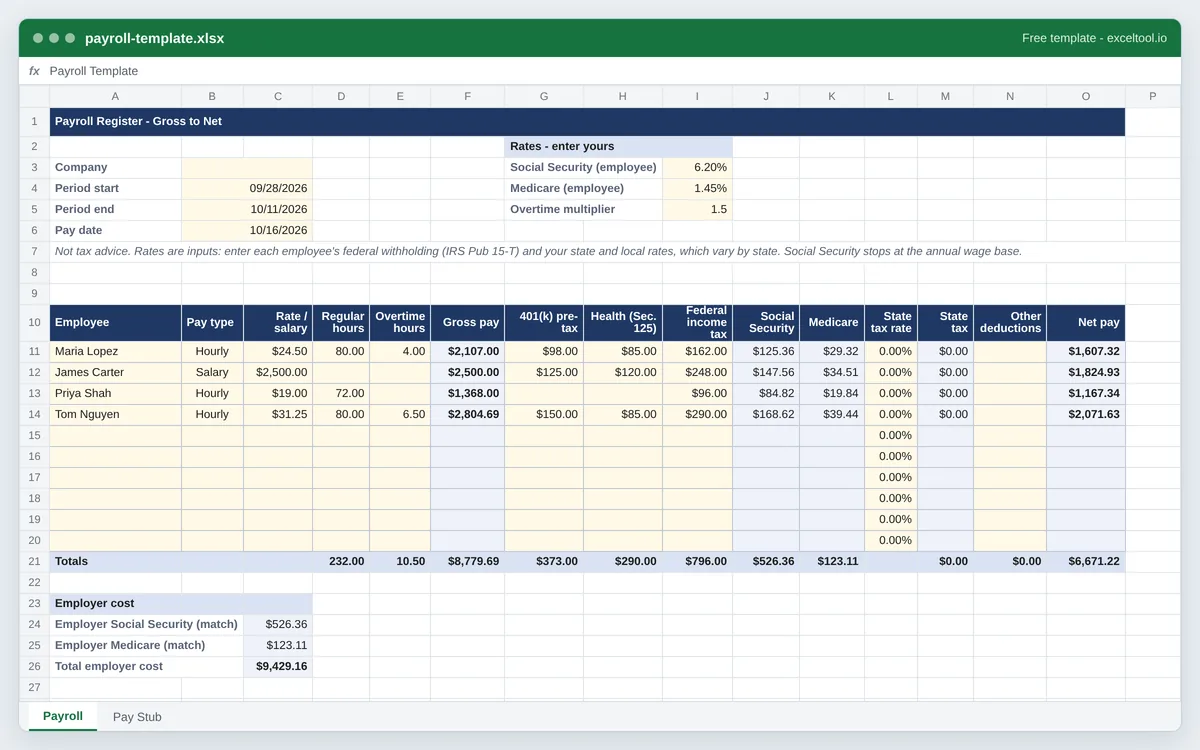
- One row per employee: hourly or salary, regular and overtime hours, and gross pay with overtime at the multiplier you set.
- Pre-tax 401(k) and Section 125 health deductions handled the way US payroll treats them for income tax and FICA.
- Social Security, Medicare and state tax at rates you enter, federal withholding typed per employee - no built-in tax tables.
Opens in Excel, Google Sheets (File > Import), Apple Numbers and LibreOffice. Built in your browser; nothing is uploaded.
Not tax advice. No tax tables are built in: federal withholding comes from each employee's W-4 and IRS Publication 15-T, and state and local rates vary by state, so you enter them.
| A | B | C | D | E | F | G | H | I | |
|---|---|---|---|---|---|---|---|---|---|
| 1 | Payroll Register - Gross to Net | ||||||||
| 2 | Rates - enter yours | ||||||||
| 3 | Company | Social Security (employee) | 0.062 | ||||||
| 4 | Period start | 46293 | Medicare (employee) | 0.014499999999999999 | |||||
| 5 | Period end | 46306 | Overtime multiplier | 1.5 | |||||
| 6 | Pay date | 46311 | |||||||
| 7 | Not tax advice. Rates are inputs: enter each employee's federal withholding (IRS Pub 15-T) and your state and local rates, which vary by state. Social Security stops at the annual wage base. | ||||||||
| 8 | |||||||||
| 9 | |||||||||
| 10 | Employee | Pay type | Rate / salary | Regular hours | Overtime hours | Gross pay | 401(k) pre-tax | Health (Sec. 125) | Federal income tax |
| 11 | Maria Lopez | Hourly | 24.5 | 80 | 4 | =IF(A11="","",IF(B11="Salary",C11,ROUND(C11*D11+C11*E11*$I$5,2))) | 98 | 85 | 162 |
| 12 | James Carter | Salary | 2500 | =IF(A12="","",IF(B12="Salary",C12,ROUND(C12*D12+C12*E12*$I$5,2))) | 125 | 120 | 248 | ||
| 13 | Priya Shah | Hourly | 19 | 72 | =IF(A13="","",IF(B13="Salary",C13,ROUND(C13*D13+C13*E13*$I$5,2))) | 96 | |||
| 14 | Tom Nguyen | Hourly | 31.25 | 80 | 6.5 | =IF(A14="","",IF(B14="Salary",C14,ROUND(C14*D14+C14*E14*$I$5,2))) | 150 | 85 | 290 |
| 15 | =IF(A15="","",IF(B15="Salary",C15,ROUND(C15*D15+C15*E15*$I$5,2))) | ||||||||
| 16 | =IF(A16="","",IF(B16="Salary",C16,ROUND(C16*D16+C16*E16*$I$5,2))) | ||||||||
| 17 | =IF(A17="","",IF(B17="Salary",C17,ROUND(C17*D17+C17*E17*$I$5,2))) | ||||||||
| 18 | =IF(A18="","",IF(B18="Salary",C18,ROUND(C18*D18+C18*E18*$I$5,2))) | ||||||||
| 19 | =IF(A19="","",IF(B19="Salary",C19,ROUND(C19*D19+C19*E19*$I$5,2))) | ||||||||
| 20 | =IF(A20="","",IF(B20="Salary",C20,ROUND(C20*D20+C20*E20*$I$5,2))) | ||||||||
| 21 | Totals | =SUM(D11:D20) | =SUM(E11:E20) | =SUM(F11:F20) | =SUM(G11:G20) | =SUM(H11:H20) | =SUM(I11:I20) | ||
| 22 |
Preview of the first 22 rows. Cells shown as =SUM(...) are live formulas in the downloaded workbook, not pasted numbers.
What you get
- •One row per employee: hourly or salary, regular and overtime hours, and gross pay with overtime at the multiplier you set.
- •Pre-tax 401(k) and Section 125 health deductions handled the way US payroll treats them for income tax and FICA.
- •Social Security, Medicare and state tax at rates you enter, federal withholding typed per employee - no built-in tax tables.
- •A pay stub sheet: pick an employee and it lays out earnings, deductions and net pay, with a check stub block.
Other templates
About this template
Running payroll by hand comes down to the same arithmetic every pay period: hours times rate plus overtime gives gross pay; pre-tax deductions come off; Social Security, Medicare, federal and state income tax are withheld; what is left is the net pay on the check. This workbook lays that out as a payroll register, one employee per row, so the whole period's payroll and the employer's share of FICA are on one sheet.
It deliberately contains no tax tables. Federal income tax withholding depends on each employee's Form W-4 and the IRS's Publication 15-T for the year; state income tax ranges from none at all to several percent and some cities add their own; even Social Security has an annual wage cap. So every rate is a cell you fill in: the Social Security and Medicare rates sit in the rate block at the top (pre-filled with the employee rates of 6.2% and 1.45% - check them for your year), each employee has a column for the federal amount withheld and their state rate, and nothing is hidden inside a formula. It is a calculator, not tax advice.
The register: company and pay period in rows 3 to 6, the rate block to the right, and the employee table from row 10 - Employee, Pay type, Rate or salary, Regular hours, Overtime hours, Gross pay, 401(k), Health (Sec. 125), Federal income tax, Social Security, Medicare, State tax rate, State tax, Other deductions and Net pay. A totals row and the employer's FICA match follow.
The order of operations follows how US payroll treats the common deductions: a traditional 401(k) deferral reduces wages for income tax but not for Social Security and Medicare, while Section 125 health premiums reduce both. The Pay Stub sheet looks up one employee and prints a stub with earnings, each deduction, net pay and a check block.
How to use it
- Set the pay period and check the rates - Company name, period start and end and the pay date go in B3 to B6. In the rate block, confirm the Social Security and Medicare rates and the overtime multiplier (1.5 is the FLSA time-and-a-half for non-exempt employees over 40 hours a week).
- Add each employee - Name and pay type: Hourly employees need the hourly rate and hours, Salary employees the salary for this pay period (an annual salary divided by 26 for biweekly, for example).
- Enter deductions and withholding - 401(k) and health premium amounts per period, the federal income tax to withhold (worked out from the employee's W-4 with IRS Publication 15-T or your payroll provider's calculator), their state tax rate and any other after-tax deductions.
- Check the net pay and totals - Net pay is gross minus every deduction and tax. The totals row gives the period's payroll; the employer section adds the employer's matching Social Security and Medicare to show the full cost.
- Print pay stubs - On the Pay Stub sheet, choose an employee from the drop-down in B6. The stub fills in from the register; print it or save it as PDF, then pick the next name.
Formulas in this workbook
Every formula below is written into the workbook itself, exactly as shown. The cell references are the ones the default options produce; change the row or column counts and they shift to match.
=IF(A11="","",IF(B11="Salary",C11,ROUND(C11*D11+C11*E11*$I$5,2)))- Gross pay: salary employees get the period salary; hourly employees get rate times regular hours plus rate times overtime hours times the overtime multiplier in I5.=IF(A11="","",ROUND((F11-N(H11))*$I$3,2))- Employee Social Security: gross pay less Section 125 health premiums, times the rate in I3. Medicare is the same calculation with the rate in I4. A 401(k) deferral is not subtracted here because it is still subject to FICA.=IF(A11="","",ROUND((F11-N(G11)-N(H11))*N(L11),2))- State income tax: gross less 401(k) and health deductions, times the employee's state rate in column L. Some states treat 401(k) deferrals differently - adjust if yours does.=IF(A11="","",F11-N(G11)-N(H11)-N(I11)-J11-K11-M11-N(N11))- Net pay: gross pay minus 401(k), health, federal income tax, Social Security, Medicare, state tax and other deductions.=SUM(F11:F20)- The totals row adds each money column for the period; gross pay is shown here.=F21+J21+K21- Total employer cost: gross payroll plus the employer's matching Social Security and Medicare, which equal the employees' shares.=IFERROR(MATCH(B6,Payroll!$A$11:$A$20,0),"")- On the Pay Stub sheet: finds which register row holds the chosen employee.=IFERROR(INDEX(Payroll!$F$11:$F$20,$E$6),0)- Pay stub lines read the register with INDEX at that row - gross pay here, and each deduction the same way.
Customising it
- Cap Social Security at the annual wage base by adding a year-to-date wages column and limiting the taxable wages to whatever is left under the cap.
- Add a local tax column (city or county income tax) beside the state tax with its own rate, and include it in the net pay formula.
- For a weekly payroll, change the period dates and keep everything else; the register does not assume a pay frequency.
- Keep one sheet per pay period by copying the Payroll sheet and naming it by pay date; a summary sheet can then add up year-to-date figures for W-2s.
- Employer-only taxes (FUTA, state unemployment) are not included - add rows under the employer section with your rates if you want the full cost.
Frequently Asked Questions
No - it takes the federal income tax to withhold as an amount you enter for each employee. Withholding depends on the employee's Form W-4, pay frequency and the IRS's tables for the year (Publication 15-T), and a spreadsheet that guessed would be wrong for many people. The template handles everything around it.
The rate block is pre-filled with the employee Social Security rate of 6.2% and Medicare rate of 1.45%; check them against the IRS for your year. State and local income tax rates vary by state (several states have none), so enter your own in each employee's state rate column. This is not tax advice - a payroll provider or accountant can confirm your rates.
Overtime hours are paid at the hourly rate times the multiplier in I5, 1.5 by default - the FLSA's time and a half for non-exempt employees over 40 hours in a workweek. Enter the overtime hours from your timesheets; some states also require daily overtime.
Yes. The Pay Stub sheet has a drop-down of the employees on the register; choose one and it shows their earnings, deductions, net pay and a check block with the pay date and amount, ready to print on plain paper.
Because traditional 401(k) deferrals are exempt from federal income tax withholding but still subject to FICA. Section 125 cafeteria-plan health premiums are generally exempt from both, so they come off before every tax.