Sign-In Sheet Template - Printable Event, Visitor and Meeting Sign-In
A printable sign-in sheet with numbered lines sized for handwriting. Event, visitor log and meeting versions, as a US Letter PDF or an Excel file.
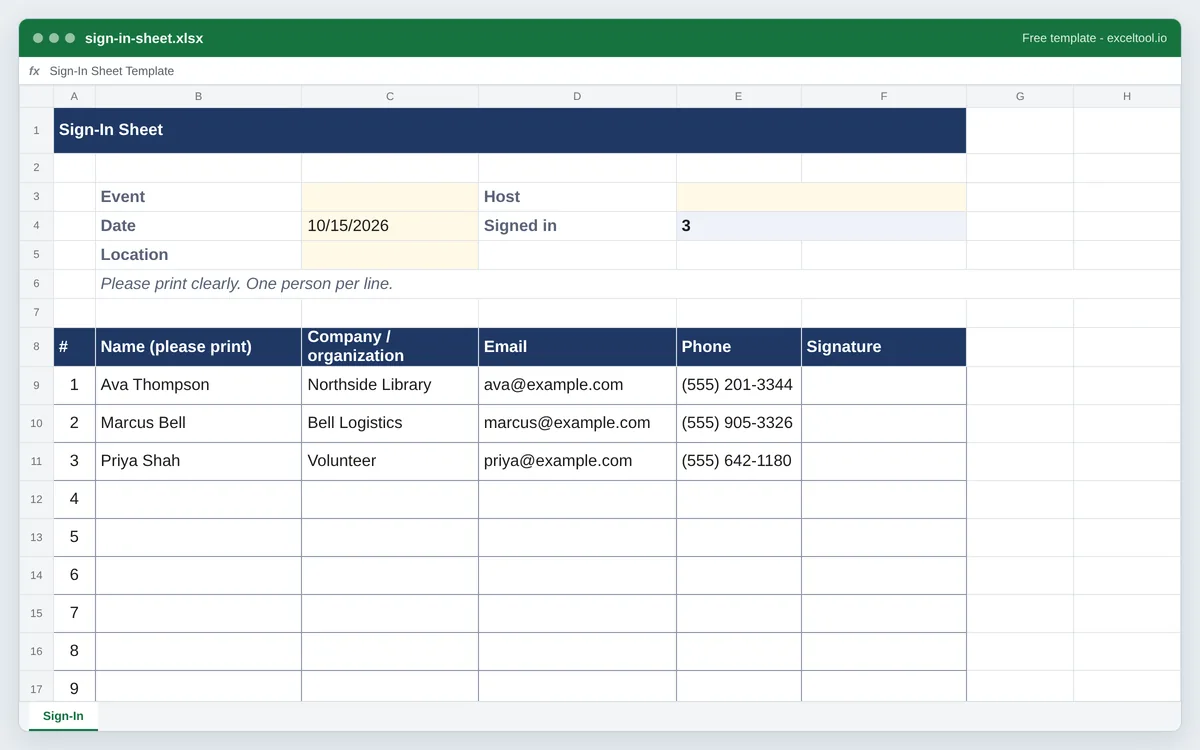
- Numbered lines sized for handwriting, with the column headings repeated on every printed page.
- Event, visitor log and meeting versions with the columns each one needs.
- A header for the event name, date, location and host.
Opens in Excel, Google Sheets (File > Import), Apple Numbers and LibreOffice. Built in your browser; nothing is uploaded.
Event, visitor log and meeting versions in the options below. Tracking the same group every day? Use the attendance sheet template.
| A | B | C | D | E | F | |
|---|---|---|---|---|---|---|
| 1 | Sign-In Sheet | |||||
| 2 | ||||||
| 3 | Event | Host | ||||
| 4 | Date | 46310 | Signed in | =COUNTA(B9:B33) | ||
| 5 | Location | |||||
| 6 | Please print clearly. One person per line. | |||||
| 7 | ||||||
| 8 | # | Name (please print) | Company / organization | Phone | Signature | |
| 9 | 1 | Ava Thompson | Northside Library | ava@example.com | (555) 201-3344 | |
| 10 | 2 | Marcus Bell | Bell Logistics | marcus@example.com | (555) 905-3326 | |
| 11 | 3 | Priya Shah | Volunteer | priya@example.com | (555) 642-1180 | |
| 12 | 4 | |||||
| 13 | 5 | |||||
| 14 | 6 | |||||
| 15 | 7 | |||||
| 16 | 8 | |||||
| 17 | 9 | |||||
| 18 | 10 | |||||
| 19 | 11 | |||||
| 20 | 12 | |||||
| 21 | 13 | |||||
| 22 | 14 |
Preview of the first 22 rows. Cells shown as =SUM(...) are live formulas in the downloaded workbook, not pasted numbers.
What you get
- •Numbered lines sized for handwriting, with the column headings repeated on every printed page.
- •Event, visitor log and meeting versions with the columns each one needs.
- •A header for the event name, date, location and host.
- •A signed-in count, and on the visitor log, hours on site from time in and time out.
Other templates
About this template
A sign-in sheet is the clipboard by the door: everyone who arrives writes their name and contact details, and afterwards you have a record of who came. Events use it for follow-up emails and headcounts, offices use a visitor log for security and fire safety, and meetings, trainings and volunteer shifts use it as proof of attendance.
Most of the time it is printed and filled in by hand, so the PDF is the main download here: a US Letter page with the event details at the top and numbered, ruled lines tall enough to write on comfortably. The Excel version is the same sheet, for when you want to change the columns, print more pages or type the names in afterwards for a mailing list.
There are three versions. The event sign-in sheet has name, company or organization, email, phone and signature - the details you need to follow up. The visitor log adds who they are visiting, the purpose, time in and time out (with hours on site worked out in Excel) and a badge number, and prints in landscape. The meeting version keeps it to name, title or department, email and signature.
Collecting names and contact details from the public carries privacy expectations; tell people what the list is for, and keep it no longer than you need it.
How to use it
- Choose the version - Event, visitor log or meeting on this page. Each has its own columns and page orientation.
- Fill in the header - Event or meeting name, date, location and host at the top - on screen before printing, or by hand on the printout.
- Print enough pages - Each page holds about 25 lines in portrait. Set the number of lines on this page for a bigger event; the column headings repeat on every printed page.
- Type it up afterwards (optional) - Enter the names in the Excel version to build a follow-up list. The Signed in cell counts the names, and on the visitor log the hours on site are calculated from time in and time out.
Formulas in this workbook
Every formula below is written into the workbook itself, exactly as shown. The cell references are the ones the default options produce; change the row or column counts and they shift to match.
=COUNTA(B9:B33)- Signed in: how many lines have a name, for the headcount. (The visitor log also works out hours on site on each line with =IF(COUNT(F9,G9)=2,ROUND(MOD(G9-F9,1)*24,2),""), which wraps a visit past midnight.)
Customising it
- Add a column for a COVID-style health screening question, a dietary choice, or "How did you hear about us?" by inserting a column before Signature.
- Put your logo over the title row with Insert > Pictures.
- Add a checkbox column for consent to receive emails if you plan to add sign-ups to a mailing list.
- For a multi-day event, copy the sheet once per day and change the date.
Frequently Asked Questions
At minimum the name and a signature or time. For events, add email and phone for follow-up; for visitors, who they are seeing, the purpose and time in and out. A header with the event name, date and location makes the sheet useful later.
Yes - the PDF download is a ready-to-print sign-in sheet on US Letter paper with numbered, ruled lines and the column headings on every page.
About 25 lines per page in portrait, with rows tall enough to write in. The visitor log prints in landscape with more columns and about 18 lines per page.
A sign-in sheet is filled in by the people arriving, once, for one event or day. An attendance sheet is kept by a teacher or manager for a fixed group over many days. This site has a separate attendance sheet template for that.