Depreciation Schedule Excel Template - MACRS and Straight-Line
A year-by-year depreciation schedule with the IRS MACRS percentages (Publication 946, Table A-1) beside straight-line, plus a fixed asset register.
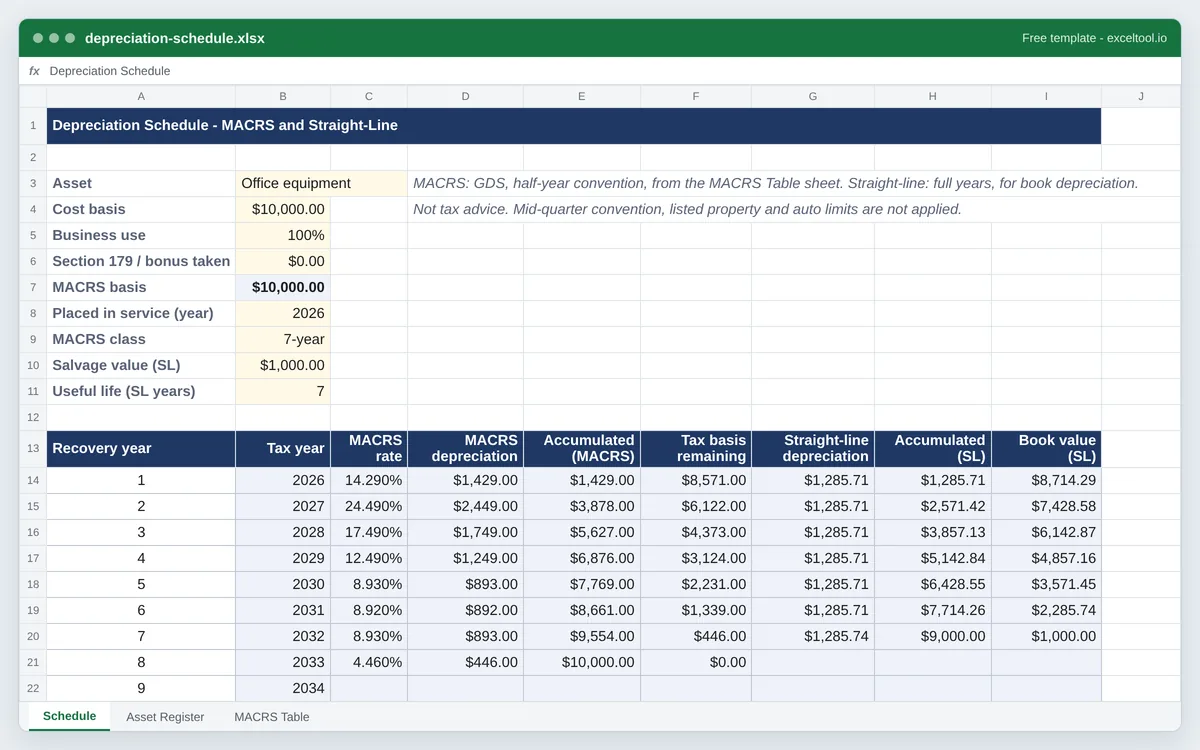
- MACRS depreciation for 3-, 5-, 7-, 10-, 15- and 20-year property, using the IRS half-year convention percentages from Publication 946, Table A-1.
- A straight-line schedule beside it, with salvage value and useful life, for book depreciation.
- Business-use percentage and Section 179 or bonus depreciation reduce the MACRS basis before the table applies.
Opens in Excel, Google Sheets (File > Import), Apple Numbers and LibreOffice. Built in your browser; nothing is uploaded.
MACRS percentages from IRS Publication 946 (2025), Appendix A, Table A-1, half-year convention. Not tax advice.
| A | B | C | D | E | F | G | H | I | |
|---|---|---|---|---|---|---|---|---|---|
| 1 | Depreciation Schedule - MACRS and Straight-Line | ||||||||
| 2 | |||||||||
| 3 | Asset | Office equipment | MACRS: GDS, half-year convention, from the MACRS Table sheet. Straight-line: full years, for book depreciation. | ||||||
| 4 | Cost basis | 10000 | Not tax advice. Mid-quarter convention, listed property and auto limits are not applied. | ||||||
| 5 | Business use | 1 | |||||||
| 6 | Section 179 / bonus taken | 0 | |||||||
| 7 | MACRS basis | =ROUND(B4*B5,2)-B6 | |||||||
| 8 | Placed in service (year) | 2026 | |||||||
| 9 | MACRS class | 7 | |||||||
| 10 | Salvage value (SL) | 1000 | |||||||
| 11 | Useful life (SL years) | 7 | |||||||
| 12 | |||||||||
| 13 | Recovery year | Tax year | MACRS rate | MACRS depreciation | Accumulated (MACRS) | Tax basis remaining | Straight-line depreciation | Accumulated (SL) | Book value (SL) |
| 14 | 1 | =$B$8+A14-1 | =IFERROR(IF(A14>$B$9+1,"",INDEX('MACRS Table'!$B$5:$G$25,A14,MATCH($B$9,'MACRS Table'!$B$4:$G$4,0))),"") | =IF(C14="","",IF(A14=$B$9+1,$B$7-SUM($D$13:D13),ROUND($B$7*C14,2))) | =IF(D14="","",SUM($D$14:D14)) | =IF(D14="","",$B$7-E14) | =IF(A14>$B$11,"",IF(A14=$B$11,($B$4*$B$5-$B$10)-SUM($G$13:G13),ROUND(($B$4*$B$5-$B$10)/$B$11,2))) | =IF(G14="","",SUM($G$14:G14)) | =IF(G14="","",$B$4*$B$5-H14) |
| 15 | 2 | =$B$8+A15-1 | =IFERROR(IF(A15>$B$9+1,"",INDEX('MACRS Table'!$B$5:$G$25,A15,MATCH($B$9,'MACRS Table'!$B$4:$G$4,0))),"") | =IF(C15="","",IF(A15=$B$9+1,$B$7-SUM($D$13:D14),ROUND($B$7*C15,2))) | =IF(D15="","",SUM($D$14:D15)) | =IF(D15="","",$B$7-E15) | =IF(A15>$B$11,"",IF(A15=$B$11,($B$4*$B$5-$B$10)-SUM($G$13:G14),ROUND(($B$4*$B$5-$B$10)/$B$11,2))) | =IF(G15="","",SUM($G$14:G15)) | =IF(G15="","",$B$4*$B$5-H15) |
| 16 | 3 | =$B$8+A16-1 | =IFERROR(IF(A16>$B$9+1,"",INDEX('MACRS Table'!$B$5:$G$25,A16,MATCH($B$9,'MACRS Table'!$B$4:$G$4,0))),"") | =IF(C16="","",IF(A16=$B$9+1,$B$7-SUM($D$13:D15),ROUND($B$7*C16,2))) | =IF(D16="","",SUM($D$14:D16)) | =IF(D16="","",$B$7-E16) | =IF(A16>$B$11,"",IF(A16=$B$11,($B$4*$B$5-$B$10)-SUM($G$13:G15),ROUND(($B$4*$B$5-$B$10)/$B$11,2))) | =IF(G16="","",SUM($G$14:G16)) | =IF(G16="","",$B$4*$B$5-H16) |
| 17 | 4 | =$B$8+A17-1 | =IFERROR(IF(A17>$B$9+1,"",INDEX('MACRS Table'!$B$5:$G$25,A17,MATCH($B$9,'MACRS Table'!$B$4:$G$4,0))),"") | =IF(C17="","",IF(A17=$B$9+1,$B$7-SUM($D$13:D16),ROUND($B$7*C17,2))) | =IF(D17="","",SUM($D$14:D17)) | =IF(D17="","",$B$7-E17) | =IF(A17>$B$11,"",IF(A17=$B$11,($B$4*$B$5-$B$10)-SUM($G$13:G16),ROUND(($B$4*$B$5-$B$10)/$B$11,2))) | =IF(G17="","",SUM($G$14:G17)) | =IF(G17="","",$B$4*$B$5-H17) |
| 18 | 5 | =$B$8+A18-1 | =IFERROR(IF(A18>$B$9+1,"",INDEX('MACRS Table'!$B$5:$G$25,A18,MATCH($B$9,'MACRS Table'!$B$4:$G$4,0))),"") | =IF(C18="","",IF(A18=$B$9+1,$B$7-SUM($D$13:D17),ROUND($B$7*C18,2))) | =IF(D18="","",SUM($D$14:D18)) | =IF(D18="","",$B$7-E18) | =IF(A18>$B$11,"",IF(A18=$B$11,($B$4*$B$5-$B$10)-SUM($G$13:G17),ROUND(($B$4*$B$5-$B$10)/$B$11,2))) | =IF(G18="","",SUM($G$14:G18)) | =IF(G18="","",$B$4*$B$5-H18) |
| 19 | 6 | =$B$8+A19-1 | =IFERROR(IF(A19>$B$9+1,"",INDEX('MACRS Table'!$B$5:$G$25,A19,MATCH($B$9,'MACRS Table'!$B$4:$G$4,0))),"") | =IF(C19="","",IF(A19=$B$9+1,$B$7-SUM($D$13:D18),ROUND($B$7*C19,2))) | =IF(D19="","",SUM($D$14:D19)) | =IF(D19="","",$B$7-E19) | =IF(A19>$B$11,"",IF(A19=$B$11,($B$4*$B$5-$B$10)-SUM($G$13:G18),ROUND(($B$4*$B$5-$B$10)/$B$11,2))) | =IF(G19="","",SUM($G$14:G19)) | =IF(G19="","",$B$4*$B$5-H19) |
| 20 | 7 | =$B$8+A20-1 | =IFERROR(IF(A20>$B$9+1,"",INDEX('MACRS Table'!$B$5:$G$25,A20,MATCH($B$9,'MACRS Table'!$B$4:$G$4,0))),"") | =IF(C20="","",IF(A20=$B$9+1,$B$7-SUM($D$13:D19),ROUND($B$7*C20,2))) | =IF(D20="","",SUM($D$14:D20)) | =IF(D20="","",$B$7-E20) | =IF(A20>$B$11,"",IF(A20=$B$11,($B$4*$B$5-$B$10)-SUM($G$13:G19),ROUND(($B$4*$B$5-$B$10)/$B$11,2))) | =IF(G20="","",SUM($G$14:G20)) | =IF(G20="","",$B$4*$B$5-H20) |
| 21 | 8 | =$B$8+A21-1 | =IFERROR(IF(A21>$B$9+1,"",INDEX('MACRS Table'!$B$5:$G$25,A21,MATCH($B$9,'MACRS Table'!$B$4:$G$4,0))),"") | =IF(C21="","",IF(A21=$B$9+1,$B$7-SUM($D$13:D20),ROUND($B$7*C21,2))) | =IF(D21="","",SUM($D$14:D21)) | =IF(D21="","",$B$7-E21) | =IF(A21>$B$11,"",IF(A21=$B$11,($B$4*$B$5-$B$10)-SUM($G$13:G20),ROUND(($B$4*$B$5-$B$10)/$B$11,2))) | =IF(G21="","",SUM($G$14:G21)) | =IF(G21="","",$B$4*$B$5-H21) |
| 22 | 9 | =$B$8+A22-1 | =IFERROR(IF(A22>$B$9+1,"",INDEX('MACRS Table'!$B$5:$G$25,A22,MATCH($B$9,'MACRS Table'!$B$4:$G$4,0))),"") | =IF(C22="","",IF(A22=$B$9+1,$B$7-SUM($D$13:D21),ROUND($B$7*C22,2))) | =IF(D22="","",SUM($D$14:D22)) | =IF(D22="","",$B$7-E22) | =IF(A22>$B$11,"",IF(A22=$B$11,($B$4*$B$5-$B$10)-SUM($G$13:G21),ROUND(($B$4*$B$5-$B$10)/$B$11,2))) | =IF(G22="","",SUM($G$14:G22)) | =IF(G22="","",$B$4*$B$5-H22) |
Preview of the first 22 rows. Cells shown as =SUM(...) are live formulas in the downloaded workbook, not pasted numbers.
What you get
- •MACRS depreciation for 3-, 5-, 7-, 10-, 15- and 20-year property, using the IRS half-year convention percentages from Publication 946, Table A-1.
- •A straight-line schedule beside it, with salvage value and useful life, for book depreciation.
- •Business-use percentage and Section 179 or bonus depreciation reduce the MACRS basis before the table applies.
- •A fixed asset register that gives each asset's deduction and accumulated depreciation for any report year.
Other templates
About this template
A depreciation schedule spreads the cost of a long-lived asset - a vehicle, machinery, computers, furniture - over the years it is used, one deduction per year. In the US there are usually two schedules for the same asset: MACRS for the tax return, because that is what the IRS requires for most business property, and straight-line for the books, because it is simpler and closer to how the asset actually wears out. This workbook keeps both side by side.
The MACRS column uses the percentages in IRS Publication 946 (2025), Appendix A, Table A-1: the General Depreciation System with the half-year convention, 200% declining balance for 3-, 5-, 7- and 10-year property and 150% for 15- and 20-year property. The half-year convention treats every asset as placed in service in the middle of the year, which is why 5-year property is deducted over six tax years. The table is on its own sheet, so the source of every percentage is visible.
The Schedule sheet takes one asset: cost, business-use percentage, any Section 179 deduction or bonus depreciation already taken (which comes off the basis before MACRS), the year placed in service and the MACRS class, plus a salvage value and useful life for the straight-line side. Row 13 heads the table - recovery year, tax year, MACRS rate, deduction, accumulated depreciation and remaining tax basis, then the straight-line deduction, accumulated and book value.
The defaults reproduce the worked example in Publication 946: a $10,000 piece of 7-year property gives deductions of $1,429, $2,449, $1,749, $1,249, $893, $892, $893 and $446. It is a calculator, not tax advice - the mid-quarter convention (required when more than 40% of a year's assets are placed in service in the last quarter), listed property and the luxury auto limits for cars are not modelled.
How to use it
- Enter the asset on the Schedule sheet - Cost basis in B4, business-use percentage in B5, and any Section 179 or bonus depreciation you are claiming in B6. B7 works out the basis MACRS applies to.
- Pick the MACRS class - B9 has a drop-down of 3, 5, 7, 10, 15 and 20 years. Computers and vehicles are generally 5-year property, office furniture 7-year, land improvements 15-year; Publication 946's Appendix B lists the class for each type of asset.
- Set the straight-line inputs - Salvage value (what you expect it to be worth at the end) in B10 and useful life in years in B11. Straight-line deducts the cost less salvage in equal amounts.
- Read the schedule - Each row is one tax year from the year placed in service. MACRS deductions stop after the class's recovery period; the last one takes whatever basis is left so the total is exact to the cent.
- List every asset in the Asset Register - One row per asset with its year, cost, use and class. Set the report year in B3 and the register shows each asset's deduction for that year and its accumulated depreciation to date - the figures that go on Form 4562 and the balance sheet.
Formulas in this workbook
Every formula below is written into the workbook itself, exactly as shown. The cell references are the ones the default options produce; change the row or column counts and they shift to match.
=ROUND(B4*B5,2)-B6- MACRS depreciable basis: cost times business-use percentage, less Section 179 or bonus depreciation.=$B$8+A14-1- The tax year of each recovery year, counted from the year placed in service.=IFERROR(IF(A14>$B$9+1,"",INDEX('MACRS Table'!$B$5:$G$25,A14,MATCH($B$9,'MACRS Table'!$B$4:$G$4,0))),"")- The MACRS percentage: INDEX picks the row for the recovery year and MATCH the column for the class in B9 from the MACRS Table sheet. Years past the recovery period (class + 1 under the half-year convention) are blank.=IF(C14="","",IF(A14=$B$9+1,$B$7-SUM($D$13:D13),ROUND($B$7*C14,2)))- The MACRS deduction: basis times the year's percentage, rounded to the cent. The final recovery year takes the remaining basis instead, so the deductions add up to exactly the basis.=IF(D14="","",SUM($D$14:D14))- Accumulated MACRS depreciation to the end of each year; the straight-line side has the same running SUM.=IF(D14="","",$B$7-E14)- Tax basis remaining after each year's deduction.=IF(A14>$B$11,"",IF(A14=$B$11,($B$4*$B$5-$B$10)-SUM($G$13:G13),ROUND(($B$4*$B$5-$B$10)/$B$11,2)))- Straight-line deduction: cost (times business use) less salvage, divided by the useful life, with the last year taking any rounding remainder.=IF(G14="","",$B$4*$B$5-H14)- Straight-line book value: cost less accumulated straight-line depreciation; it ends at the salvage value.=SUM(D14:D34)- Total MACRS depreciation over the schedule, which equals the MACRS basis; the straight-line total sits beside it.=IF(C6="","",ROUND(C6*D6,2)-N(E6))- On the Asset Register: the depreciable basis - cost times business use, less any Section 179 or bonus amount (N() reads an empty cell as zero).=IF(H6="","",IF(OR(H6<1,H6>F6+1),0,IFERROR(INDEX('MACRS Table'!$B$5:$G$25,H6,MATCH(F6,'MACRS Table'!$B$4:$G$4,0)),0)))- On the Asset Register: this year's MACRS percentage for an asset, from its recovery year (report year minus year placed in service, plus one) and its class. Zero before it is placed in service and after it is fully depreciated.=IF(H6="","",IF(H6<1,0,ROUND(G6*IFERROR(INDEX('MACRS Table'!$I$5:$N$25,MIN(H6,F6+1),MATCH(F6,'MACRS Table'!$B$4:$G$4,0)),0),2)))- Accumulated depreciation to date on the register, from the cumulative percentages on the MACRS Table sheet. MIN caps it at the last recovery year, so a fully depreciated asset shows its whole basis.=IF(B5="","",SUM(B$5:B5))- The cumulative block on the MACRS Table sheet: each class's percentages added up to that year, reaching 100%.
Customising it
- Copy the Schedule sheet for each major asset, or use the Asset Register for everything and keep one Schedule as a calculator.
- Round deductions to whole dollars, as many returns do, by changing ROUND(...,2) to ROUND(...,0) in the MACRS and straight-line columns.
- For a fiscal year that is not the calendar year, read the Tax year column as the fiscal year the asset was placed in service in; the percentages do not change.
- To model the mid-quarter convention, add Tables A-2 to A-5 from Publication 946 to the MACRS Table sheet and point the INDEX range at the right one.
Frequently Asked Questions
The Modified Accelerated Cost Recovery System is the depreciation method the IRS requires for most business property placed in service after 1986. Each asset class has a recovery period and a method; the IRS publishes the resulting percentages in Publication 946, and the deduction each year is the basis times that year's percentage.
Because of the half-year convention: MACRS treats an asset as placed in service halfway through its first year, so the first year gets half a year's depreciation and the remaining half year falls into year six. The same is true for every class - 7-year property spans eight tax years.
From IRS Publication 946 (2025), Appendix A, Table A-1, for General Depreciation System property under the half-year convention. They are on the MACRS Table sheet exactly as published, so you can check any figure against the publication.
Partly: enter the amount of Section 179 expense or bonus depreciation you claim in B6 and the MACRS basis is reduced by it before the percentages apply, which is how the two interact on Form 4562. The workbook does not check the Section 179 dollar limits or the bonus percentage for your year.
For the arithmetic, yes - cars are 5-year property. But passenger automobiles are subject to annual depreciation caps (the Section 280F luxury auto limits) and listed-property rules, which this schedule does not apply, so check the year's limits in Publication 946 before using the figures for a car.