Rent Ledger Template with Rent Roll
A tenant rent ledger with charges, payments, late fees and a running balance, plus a rent roll of every unit with lease dates, rent, deposits and occupancy.
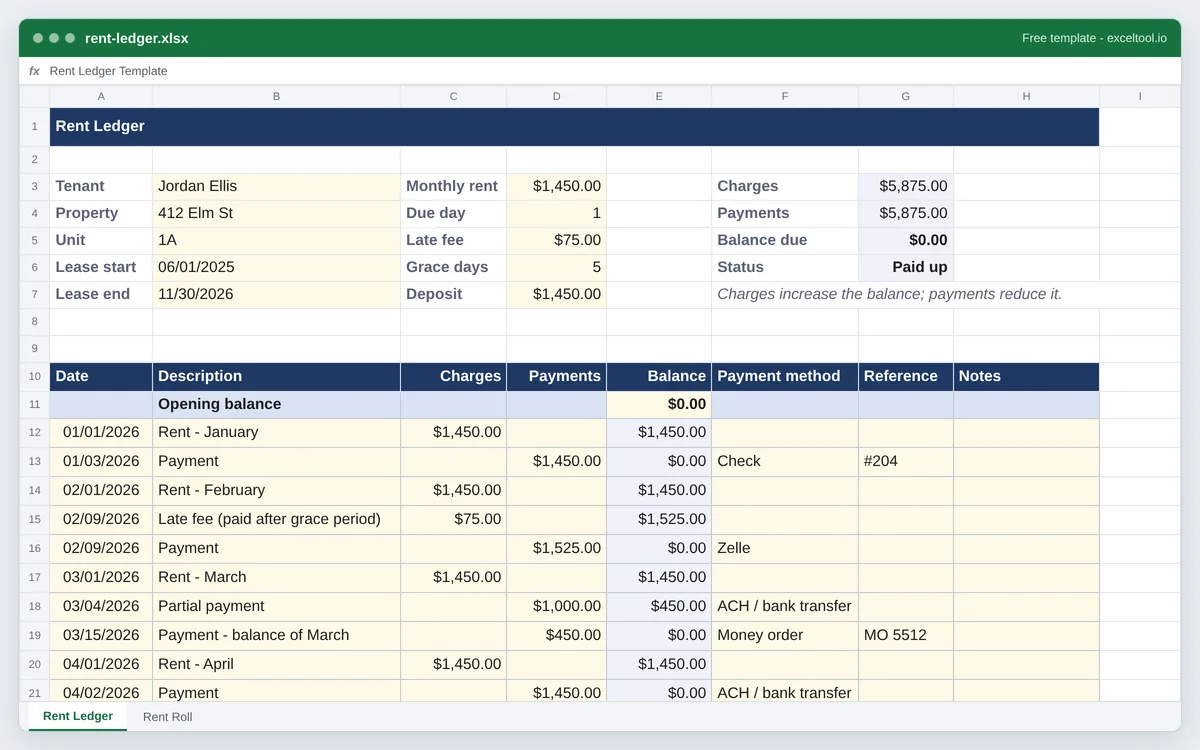
- A ledger per tenant: date, description, charges, payments, method and reference, with a running balance.
- Lease terms at the top: rent, due day, late fee, grace period and security deposit.
- A rent roll of every unit: tenant, lease start and end, rent, deposit, balance due and status.
Opens in Excel, Google Sheets (File > Import), Apple Numbers and LibreOffice. Built in your browser; nothing is uploaded.
The workbook has two sheets: a rent ledger per tenant and a rent roll for the whole property. Late fees are inputs; several states limit them.
| A | B | C | D | E | F | G | H | |
|---|---|---|---|---|---|---|---|---|
| 1 | Rent Ledger | |||||||
| 2 | ||||||||
| 3 | Tenant | Jordan Ellis | Monthly rent | 1450 | Charges | =SUM($C$12:$C$51) | ||
| 4 | Property | 412 Elm St | Due day | 1 | Payments | =SUM($D$12:$D$51) | ||
| 5 | Unit | 1A | Late fee | 75 | Balance due | =E11+G3-G4 | ||
| 6 | Lease start | 45809 | Grace days | 5 | Status | =IF(G5<=0,"Paid up","Balance due") | ||
| 7 | Lease end | 46356 | Deposit | 1450 | Charges increase the balance; payments reduce it. | |||
| 8 | ||||||||
| 9 | ||||||||
| 10 | Date | Description | Charges | Payments | Balance | Payment method | Reference | Notes |
| 11 | Opening balance | 0 | ||||||
| 12 | 46023 | Rent - January | 1450 | =IF(COUNT(C12:D12)=0,"",$E$11+SUM($C$12:C12)-SUM($D$12:D12)) | ||||
| 13 | 46025 | Payment | 1450 | =IF(COUNT(C13:D13)=0,"",$E$11+SUM($C$12:C13)-SUM($D$12:D13)) | Check | #204 | ||
| 14 | 46054 | Rent - February | 1450 | =IF(COUNT(C14:D14)=0,"",$E$11+SUM($C$12:C14)-SUM($D$12:D14)) | ||||
| 15 | 46062 | Late fee (paid after grace period) | 75 | =IF(COUNT(C15:D15)=0,"",$E$11+SUM($C$12:C15)-SUM($D$12:D15)) | ||||
| 16 | 46062 | Payment | 1525 | =IF(COUNT(C16:D16)=0,"",$E$11+SUM($C$12:C16)-SUM($D$12:D16)) | Zelle | |||
| 17 | 46082 | Rent - March | 1450 | =IF(COUNT(C17:D17)=0,"",$E$11+SUM($C$12:C17)-SUM($D$12:D17)) | ||||
| 18 | 46085 | Partial payment | 1000 | =IF(COUNT(C18:D18)=0,"",$E$11+SUM($C$12:C18)-SUM($D$12:D18)) | ACH / bank transfer | |||
| 19 | 46096 | Payment - balance of March | 450 | =IF(COUNT(C19:D19)=0,"",$E$11+SUM($C$12:C19)-SUM($D$12:D19)) | Money order | MO 5512 | ||
| 20 | 46113 | Rent - April | 1450 | =IF(COUNT(C20:D20)=0,"",$E$11+SUM($C$12:C20)-SUM($D$12:D20)) | ||||
| 21 | 46114 | Payment | 1450 | =IF(COUNT(C21:D21)=0,"",$E$11+SUM($C$12:C21)-SUM($D$12:D21)) | ACH / bank transfer | |||
| 22 | =IF(COUNT(C22:D22)=0,"",$E$11+SUM($C$12:C22)-SUM($D$12:D22)) |
Preview of the first 22 rows. Cells shown as =SUM(...) are live formulas in the downloaded workbook, not pasted numbers.
What you get
- •A ledger per tenant: date, description, charges, payments, method and reference, with a running balance.
- •Lease terms at the top: rent, due day, late fee, grace period and security deposit.
- •A rent roll of every unit: tenant, lease start and end, rent, deposit, balance due and status.
- •Occupancy rate, vacancy loss and deposits held, with leases ending in 60 days and unpaid balances highlighted.
Other templates
About this template
A rent ledger is the payment history of one tenancy: every rent charge, late fee or credit on one side, every payment received on the other, and the balance after each. Landlords need it to know who owes what, and it is the document a court, a lender or a future landlord asks for when there is a dispute about rent. Tenants keep their own for the same reason.
The Rent Ledger sheet starts with the lease terms - tenant, property, unit, lease dates, monthly rent, the day rent is due, the late fee, the grace period and the security deposit - then the ledger itself: Date, Description, Charges, Payments, Balance, Payment method, Reference and Notes from row 10. Each balance is the opening balance plus all charges so far minus all payments so far, so a blank line never breaks the column.
The Rent Roll sheet is the landlord's overview of a whole building or portfolio: one row per unit with the tenant, lease start and end, monthly rent, deposit held, balance due and status (Occupied, Vacant or Notice given). Under the table it works out the number of units, occupancy rate, scheduled rent, rent from occupied units, vacancy loss, deposits held and total balance due. Leases ending within 60 days are highlighted amber and unpaid balances red, so renewals and collections are hard to miss.
Late fees and security deposit limits are set by state and local law in the US - some states cap late fees or require a grace period - so the late fee and grace period are inputs, not rules the sheet applies.
How to use it
- Fill in the lease terms - Tenant, property, unit and lease dates in column B, and rent, due day, late fee, grace period and deposit in column D. They are reference figures for the ledger below.
- Charge rent each month - On the due date, add a line with Rent - month in Description and the rent in Charges. Late fees and other charges go in Charges on their own lines.
- Record every payment - Date received, the amount in Payments, how it was paid and a reference such as the check or money order number. The balance updates on that line.
- Keep the rent roll current - On the Rent Roll sheet, list each unit once. Update status when a tenant gives notice or moves out, and the balance due from each tenant's ledger.
- Print a statement - Print the Rent Ledger sheet (US Letter, header repeated on every page) as a tenant statement, or download the blank PDF to keep a paper ledger.
Formulas in this workbook
Every formula below is written into the workbook itself, exactly as shown. The cell references are the ones the default options produce; change the row or column counts and they shift to match.
=IF(COUNT(C12:D12)=0,"",$E$11+SUM($C$12:C12)-SUM($D$12:D12))- Running balance on the first ledger line: the opening balance in E11 plus every charge so far, minus every payment so far. Lines with no amounts stay blank.=SUM($C$12:$C$51)- Total charges in the summary block; total payments is the same SUM over the Payments column.=E11+G3-G4- Balance due: opening balance plus charges minus payments.=IF(G5<=0,"Paid up","Balance due")- Account status at a glance.=IF(D6="","",D6-TODAY())- On the Rent Roll: days until each lease ends, from today's date. Within 60 days the cell turns amber.=COUNTA(A6:A25)- Number of units on the rent roll.=COUNTIF(H6:H25,"Occupied")- Occupied units; the occupancy rate divides this by the number of units.=IFERROR(B29/B28,"")- Occupancy rate: occupied units divided by all units.=SUMIF(H6:H25,"Vacant",E6:E25)- Vacancy loss: the monthly rent of every vacant unit - income the building is not collecting.
Customising it
- Keep one Rent Ledger sheet per tenant: right-click the tab, Move or Copy, Create a copy, and rename it after the unit.
- Link the rent roll's Balance due to each ledger's balance (for example ='Unit 1A'!G5) so the roll updates itself.
- Add a Security deposit ledger below the rent ledger to track deductions at move-out, which many states require you to itemize.
- Add a Due date column and a formula comparing it with the payment date plus the grace period to flag late payments automatically.
Frequently Asked Questions
A running record of a tenancy's rent charges, payments and balance, in date order. It shows exactly when rent was charged and paid, any late fees and credits, and what is owed at any point - the record landlords and tenants rely on in a dispute.
A rent ledger is the payment history of one tenant. A rent roll is a list of every unit in a property at one moment - tenant, lease dates, rent, deposit, balance and occupancy. This template includes both, on separate sheets.
Add a line on the date the fee applies, describe it as a late fee, and put the amount in Charges. It adds to the balance like rent does. Check your lease and state law first - several states limit late fees or require a grace period.
Yes. A tenant can keep the same ledger: charges for each month's rent and payments with the check number or transfer reference, which is useful proof of payment and for renter's credit or tax purposes in states that offer them.