Mileage Log Template & IRS Mileage Reimbursement Calculator
A trip log with the columns the IRS asks for, and a reimbursement calculator that applies the 2026 standard mileage rate in force on each trip's date.
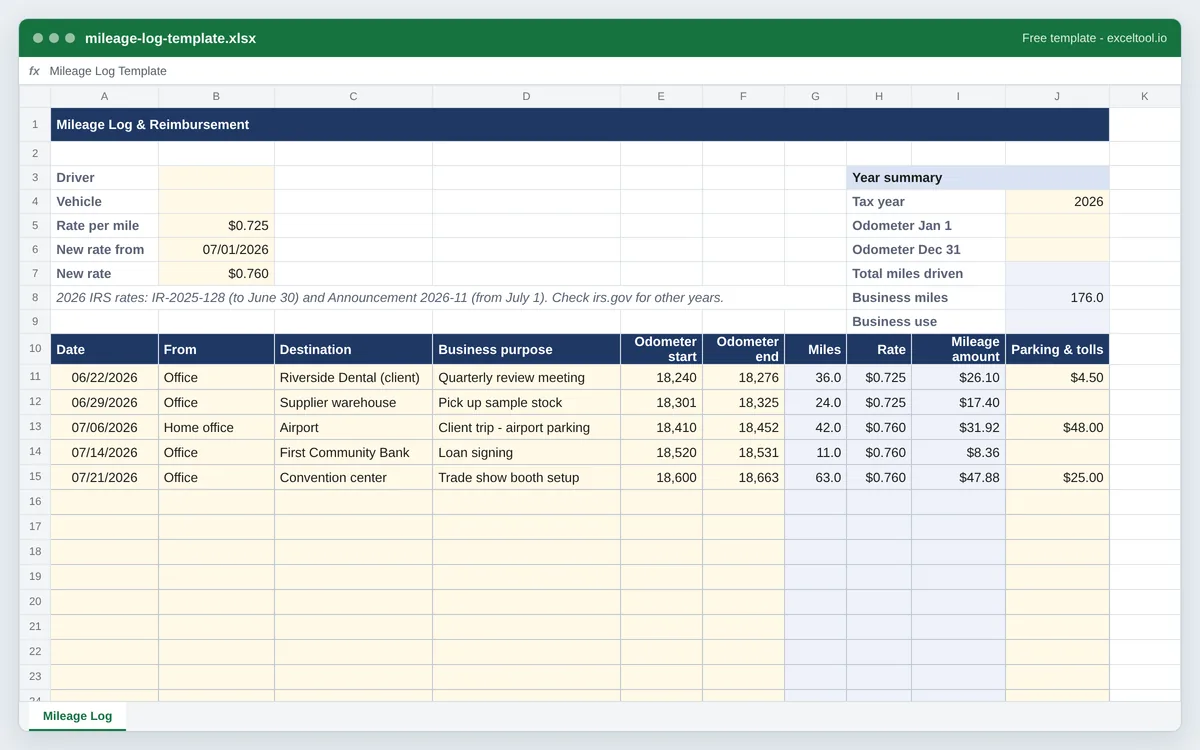
- Columns for every item the IRS expects in a mileage log: date, destination, business purpose and miles (from odometer readings).
- Each trip is priced at the rate in force on its date: 72.5¢ a mile to June 30, 2026 and 76¢ from July 1, both editable cells.
- Parking and tolls in their own column, because they are claimed on top of the standard mileage rate.
Opens in Excel, Google Sheets (File > Import), Apple Numbers and LibreOffice. Built in your browser; nothing is uploaded.
2026 IRS business rate: 72.5¢ a mile through June 30 (IR-2025-128) and 76¢ from July 1 (Announcement 2026-11). Checked against the IRS standard mileage rates page on October 18, 2026. Not tax advice.
| A | B | C | D | E | F | G | H | I | |
|---|---|---|---|---|---|---|---|---|---|
| 1 | Mileage Log & Reimbursement | ||||||||
| 2 | |||||||||
| 3 | Driver | Year summary | |||||||
| 4 | Vehicle | Tax year | |||||||
| 5 | Rate per mile | 0.725 | Odometer Jan 1 | ||||||
| 6 | New rate from | 46204 | Odometer Dec 31 | ||||||
| 7 | New rate | 0.76 | Total miles driven | ||||||
| 8 | 2026 IRS rates: IR-2025-128 (to June 30) and Announcement 2026-11 (from July 1). Check irs.gov for other years. | Business miles | |||||||
| 9 | Business use | ||||||||
| 10 | Date | From | Destination | Business purpose | Odometer start | Odometer end | Miles | Rate | Mileage amount |
| 11 | 46195 | Office | Riverside Dental (client) | Quarterly review meeting | 18240 | 18276 | =IF(COUNT(E11,F11)=2,F11-E11,"") | =IF(A11="","",IF(A11<$B$6,$B$5,$B$7)) | =IF(OR(A11="",G11=""),"",ROUND(G11*H11,2)) |
| 12 | 46202 | Office | Supplier warehouse | Pick up sample stock | 18301 | 18325 | =IF(COUNT(E12,F12)=2,F12-E12,"") | =IF(A12="","",IF(A12<$B$6,$B$5,$B$7)) | =IF(OR(A12="",G12=""),"",ROUND(G12*H12,2)) |
| 13 | 46209 | Home office | Airport | Client trip - airport parking | 18410 | 18452 | =IF(COUNT(E13,F13)=2,F13-E13,"") | =IF(A13="","",IF(A13<$B$6,$B$5,$B$7)) | =IF(OR(A13="",G13=""),"",ROUND(G13*H13,2)) |
| 14 | 46217 | Office | First Community Bank | Loan signing | 18520 | 18531 | =IF(COUNT(E14,F14)=2,F14-E14,"") | =IF(A14="","",IF(A14<$B$6,$B$5,$B$7)) | =IF(OR(A14="",G14=""),"",ROUND(G14*H14,2)) |
| 15 | 46224 | Office | Convention center | Trade show booth setup | 18600 | 18663 | =IF(COUNT(E15,F15)=2,F15-E15,"") | =IF(A15="","",IF(A15<$B$6,$B$5,$B$7)) | =IF(OR(A15="",G15=""),"",ROUND(G15*H15,2)) |
| 16 | =IF(COUNT(E16,F16)=2,F16-E16,"") | =IF(A16="","",IF(A16<$B$6,$B$5,$B$7)) | =IF(OR(A16="",G16=""),"",ROUND(G16*H16,2)) | ||||||
| 17 | =IF(COUNT(E17,F17)=2,F17-E17,"") | =IF(A17="","",IF(A17<$B$6,$B$5,$B$7)) | =IF(OR(A17="",G17=""),"",ROUND(G17*H17,2)) | ||||||
| 18 | =IF(COUNT(E18,F18)=2,F18-E18,"") | =IF(A18="","",IF(A18<$B$6,$B$5,$B$7)) | =IF(OR(A18="",G18=""),"",ROUND(G18*H18,2)) | ||||||
| 19 | =IF(COUNT(E19,F19)=2,F19-E19,"") | =IF(A19="","",IF(A19<$B$6,$B$5,$B$7)) | =IF(OR(A19="",G19=""),"",ROUND(G19*H19,2)) | ||||||
| 20 | =IF(COUNT(E20,F20)=2,F20-E20,"") | =IF(A20="","",IF(A20<$B$6,$B$5,$B$7)) | =IF(OR(A20="",G20=""),"",ROUND(G20*H20,2)) | ||||||
| 21 | =IF(COUNT(E21,F21)=2,F21-E21,"") | =IF(A21="","",IF(A21<$B$6,$B$5,$B$7)) | =IF(OR(A21="",G21=""),"",ROUND(G21*H21,2)) | ||||||
| 22 | =IF(COUNT(E22,F22)=2,F22-E22,"") | =IF(A22="","",IF(A22<$B$6,$B$5,$B$7)) | =IF(OR(A22="",G22=""),"",ROUND(G22*H22,2)) |
Preview of the first 22 rows. Cells shown as =SUM(...) are live formulas in the downloaded workbook, not pasted numbers.
What you get
- •Columns for every item the IRS expects in a mileage log: date, destination, business purpose and miles (from odometer readings).
- •Each trip is priced at the rate in force on its date: 72.5¢ a mile to June 30, 2026 and 76¢ from July 1, both editable cells.
- •Parking and tolls in their own column, because they are claimed on top of the standard mileage rate.
- •A year summary with total miles, business miles and business-use percentage for Schedule C or Form 4562.
Other templates
About this template
A mileage log does two jobs. For an employee it is the claim form: miles driven for work, multiplied by the company's per-mile rate, paid back as a non-taxable reimbursement. For the self-employed it is the evidence behind a tax deduction, and the IRS is specific about what that evidence has to contain. This workbook is built to satisfy both - one row per trip, the four items the IRS asks for, and the arithmetic done by formula.
The 2026 rates are unusual. The IRS set the business standard mileage rate at 72.5 cents a mile from January 1 (news release IR-2025-128, December 29, 2025), then raised it to 76 cents for travel on or after July 1, 2026 (Announcement 2026-11 in Internal Revenue Bulletin 2026-29, citing fuel prices). A log that multiplies the whole year by one rate is wrong for half of it. Here the Rate column reads each trip's date and picks the rate that applied that day. Medical and qualifying military moving miles went from 20.5 to 23.5 cents on the same date; charitable miles stay at 14 cents, which is set by statute. Rates were checked against irs.gov on October 18, 2026.
The sheet layout: the driver, vehicle and the three rate inputs (first rate, the date the rate changed, second rate) sit in rows 3 to 7. To the right, a year summary takes the odometer reading on January 1 and December 31 and works out total miles, business miles and the business-use percentage. Row 10 is the table header - Date, From, Destination, Business purpose, Odometer start, Odometer end, Miles, Rate, Mileage amount, Parking & tolls - and a totals row closes the table.
It is a record-keeping tool, not tax advice. Whether a trip is deductible (commuting from home to a regular workplace is not), and whether you can use the standard rate at all, depends on your situation; IRS Publication 463 has the rules.
How to use it
- Check the rate cells for your year - B5 is the rate before the change date in B6, and B7 the rate from that date on. They are pre-filled with the 2026 business rates. For a single-rate year, put the same figure in both; for medical or charity miles, choose that rate type on this page before downloading.
- Log each trip on the day - Date, where you started, the destination and the business purpose. Write the purpose the way an auditor would read it - "client meeting, Riverside Dental" rather than "meeting". The IRS wants records made at or near the time of the trip, not reconstructed in April.
- Enter odometer readings, or miles directly - With odometer start and end filled in, Miles is the difference. If you track distance with a map instead, type the miles straight into the Miles cell; the formula there is only a convenience.
- Add parking and tolls separately - Business parking fees and tolls are claimed in addition to the standard mileage rate, so they have their own column and are added to the total rather than folded into the per-mile figure.
- Fill in the year summary in January - Odometer readings for January 1 and December 31 give total miles for the year; with business miles from the log, the sheet works out the business-use percentage that Schedule C and Form 4562 ask for.
- Submit or file it - Employees: print or export the sheet and attach it to the expense claim. Self-employed: keep the workbook with your tax records - the IRS generally expects records to be kept for at least three years after you file.
Formulas in this workbook
Every formula below is written into the workbook itself, exactly as shown. The cell references are the ones the default options produce; change the row or column counts and they shift to match.
=IF(COUNT(E11,F11)=2,F11-E11,"")- Miles on the first trip row: odometer end minus odometer start, once both readings are in. Until then the cell stays empty, so an unused row adds nothing to the totals. Typing a number over it is fine when you track miles another way.=IF(A11="","",IF(A11<$B$6,$B$5,$B$7))- The rate for the trip: the first rate (B5) when the trip date is before the change date in B6, otherwise the second rate (B7). This is what makes June 30 and July 1, 2026 price differently.=IF(OR(A11="",G11=""),"",ROUND(G11*H11,2))- Mileage amount: miles times the trip's rate, rounded to the cent, and blank until the row has a date and a distance.=SUM(G11:G50)- Total miles in the totals row; the same SUM runs under the mileage amount and the parking and tolls columns.=I51+J51- Total reimbursement in the summary block: the mileage amount plus parking and tolls.=IF(COUNT(J6,J5)=2,J6-J5,"")- Total miles driven in the year, from the January 1 and December 31 odometer readings.=IF(N(J7)=0,"",J8/J7)- Business-use percentage: business miles from the log divided by total miles for the year. It stays blank until the year's total is known.
Customising it
- Track more than one vehicle by adding a Vehicle column after the date and filtering the table by it; the IRS asks for business use per vehicle.
- For a company reimbursement policy below the IRS rate, overwrite B5 and B7 with your company's rate. Reimbursements at or below the IRS rate under an accountable plan are generally not taxable wages to the employee.
- Add a Round trip column holding 1 or 2 and change the Miles formula to multiply by it, for drivers who log one-way distances.
- For 2027, replace the rates and the change date once the IRS publishes the new rates (normally in December); the formulas need no changes.
- Turn the table into an Excel Table (Ctrl+T) to get filter buttons and totals that extend automatically as you add trips.
Frequently Asked Questions
For business use it is 72.5 cents per mile for miles driven January 1 through June 30, 2026, and 76 cents per mile from July 1, 2026, after the IRS's mid-year increase (Announcement 2026-11). Medical and military moving miles are 20.5 cents and then 23.5 cents; charitable miles are 14 cents all year. The template splits trips at July 1 automatically.
For each business trip: the date, the destination, the business purpose and the miles driven. You also need total miles for the year (odometer readings at the start and end of the year help) to show the business-use percentage. The records should be made at or near the time of the trip.
Generally no. Driving between home and your regular place of work is commuting. Trips from your regular workplace to a client, between work locations, or to a temporary work site are business miles. IRS Publication 463 covers the edge cases, including a home office that is your principal place of business.
Yes. Set the rate cells to your company's per-mile rate (many employers use the IRS rate), have the employee fill in the trips, and the total in the summary is the amount to reimburse. Print it or export it to PDF for approval.
Because the IRS changed the rate on July 1, 2026. Each row compares its trip date with the change date in B6 and uses the rate that applied on that day, so a June trip is priced at 72.5 cents and a July trip at 76 cents.