CRM Template Excel - Contacts, Sales Pipeline and Follow-Ups
A simple CRM in a spreadsheet: contacts and deals with pipeline stage, deal value, weighted forecast and next follow-up date, plus a pipeline summary.
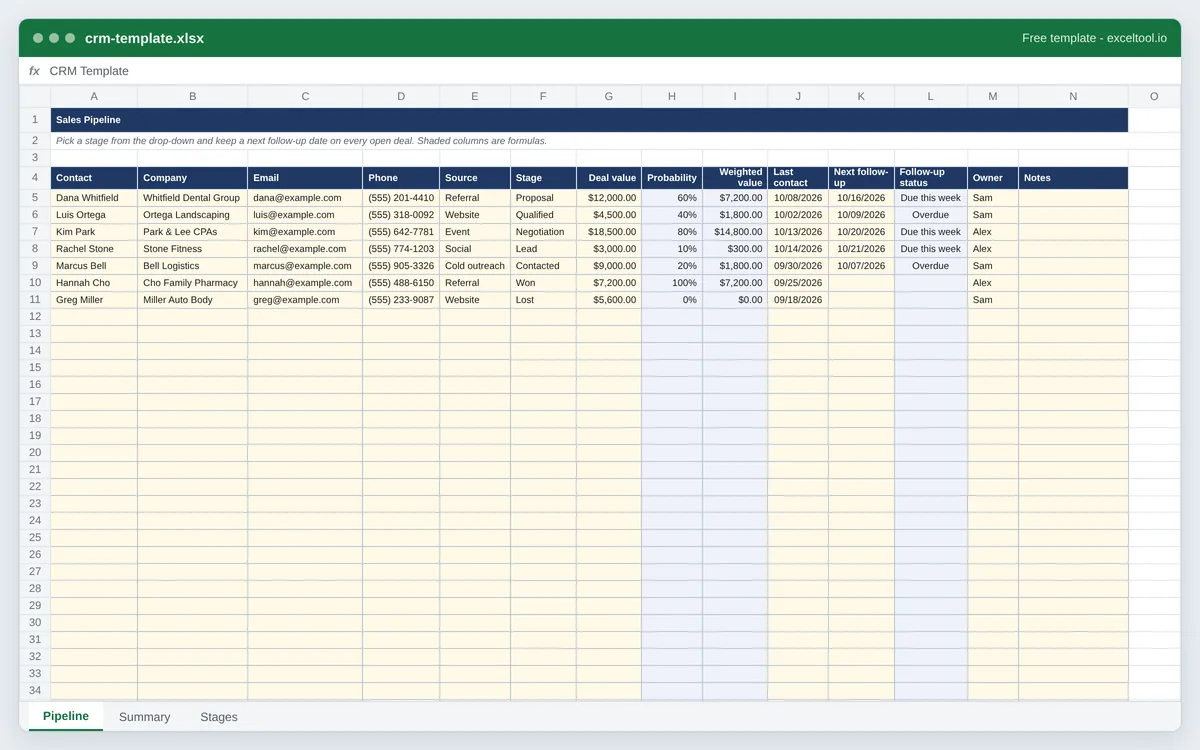
- One row per contact or deal: company, email, phone, lead source, pipeline stage, deal value and owner.
- Stage drop-downs with a win probability for each stage and a probability-weighted value per deal.
- Next follow-up dates flagged Overdue or Due this week against today's date, and highlighted.
Opens in Excel, Google Sheets (File > Import), Apple Numbers and LibreOffice. Built in your browser; nothing is uploaded.
| A | B | C | D | E | F | G | H | I | |
|---|---|---|---|---|---|---|---|---|---|
| 1 | Sales Pipeline | ||||||||
| 2 | Pick a stage from the drop-down and keep a next follow-up date on every open deal. Shaded columns are formulas. | ||||||||
| 3 | |||||||||
| 4 | Contact | Company | Phone | Source | Stage | Deal value | Probability | Weighted value | |
| 5 | Dana Whitfield | Whitfield Dental Group | dana@example.com | (555) 201-4410 | Referral | Proposal | 12000 | =IF(F5="","",IFERROR(VLOOKUP(F5,Stages!$A$4:$B$13,2,FALSE),0)) | =IF(OR(G5="",H5=""),"",G5*H5) |
| 6 | Luis Ortega | Ortega Landscaping | luis@example.com | (555) 318-0092 | Website | Qualified | 4500 | =IF(F6="","",IFERROR(VLOOKUP(F6,Stages!$A$4:$B$13,2,FALSE),0)) | =IF(OR(G6="",H6=""),"",G6*H6) |
| 7 | Kim Park | Park & Lee CPAs | kim@example.com | (555) 642-7781 | Event | Negotiation | 18500 | =IF(F7="","",IFERROR(VLOOKUP(F7,Stages!$A$4:$B$13,2,FALSE),0)) | =IF(OR(G7="",H7=""),"",G7*H7) |
| 8 | Rachel Stone | Stone Fitness | rachel@example.com | (555) 774-1203 | Social | Lead | 3000 | =IF(F8="","",IFERROR(VLOOKUP(F8,Stages!$A$4:$B$13,2,FALSE),0)) | =IF(OR(G8="",H8=""),"",G8*H8) |
| 9 | Marcus Bell | Bell Logistics | marcus@example.com | (555) 905-3326 | Cold outreach | Contacted | 9000 | =IF(F9="","",IFERROR(VLOOKUP(F9,Stages!$A$4:$B$13,2,FALSE),0)) | =IF(OR(G9="",H9=""),"",G9*H9) |
| 10 | Hannah Cho | Cho Family Pharmacy | hannah@example.com | (555) 488-6150 | Referral | Won | 7200 | =IF(F10="","",IFERROR(VLOOKUP(F10,Stages!$A$4:$B$13,2,FALSE),0)) | =IF(OR(G10="",H10=""),"",G10*H10) |
| 11 | Greg Miller | Miller Auto Body | greg@example.com | (555) 233-9087 | Website | Lost | 5600 | =IF(F11="","",IFERROR(VLOOKUP(F11,Stages!$A$4:$B$13,2,FALSE),0)) | =IF(OR(G11="",H11=""),"",G11*H11) |
| 12 | =IF(F12="","",IFERROR(VLOOKUP(F12,Stages!$A$4:$B$13,2,FALSE),0)) | =IF(OR(G12="",H12=""),"",G12*H12) | |||||||
| 13 | =IF(F13="","",IFERROR(VLOOKUP(F13,Stages!$A$4:$B$13,2,FALSE),0)) | =IF(OR(G13="",H13=""),"",G13*H13) | |||||||
| 14 | =IF(F14="","",IFERROR(VLOOKUP(F14,Stages!$A$4:$B$13,2,FALSE),0)) | =IF(OR(G14="",H14=""),"",G14*H14) | |||||||
| 15 | =IF(F15="","",IFERROR(VLOOKUP(F15,Stages!$A$4:$B$13,2,FALSE),0)) | =IF(OR(G15="",H15=""),"",G15*H15) | |||||||
| 16 | =IF(F16="","",IFERROR(VLOOKUP(F16,Stages!$A$4:$B$13,2,FALSE),0)) | =IF(OR(G16="",H16=""),"",G16*H16) | |||||||
| 17 | =IF(F17="","",IFERROR(VLOOKUP(F17,Stages!$A$4:$B$13,2,FALSE),0)) | =IF(OR(G17="",H17=""),"",G17*H17) | |||||||
| 18 | =IF(F18="","",IFERROR(VLOOKUP(F18,Stages!$A$4:$B$13,2,FALSE),0)) | =IF(OR(G18="",H18=""),"",G18*H18) | |||||||
| 19 | =IF(F19="","",IFERROR(VLOOKUP(F19,Stages!$A$4:$B$13,2,FALSE),0)) | =IF(OR(G19="",H19=""),"",G19*H19) | |||||||
| 20 | =IF(F20="","",IFERROR(VLOOKUP(F20,Stages!$A$4:$B$13,2,FALSE),0)) | =IF(OR(G20="",H20=""),"",G20*H20) | |||||||
| 21 | =IF(F21="","",IFERROR(VLOOKUP(F21,Stages!$A$4:$B$13,2,FALSE),0)) | =IF(OR(G21="",H21=""),"",G21*H21) | |||||||
| 22 | =IF(F22="","",IFERROR(VLOOKUP(F22,Stages!$A$4:$B$13,2,FALSE),0)) | =IF(OR(G22="",H22=""),"",G22*H22) |
Preview of the first 22 rows. Cells shown as =SUM(...) are live formulas in the downloaded workbook, not pasted numbers.
What you get
- •One row per contact or deal: company, email, phone, lead source, pipeline stage, deal value and owner.
- •Stage drop-downs with a win probability for each stage and a probability-weighted value per deal.
- •Next follow-up dates flagged Overdue or Due this week against today's date, and highlighted.
- •A pipeline summary: deals and value by stage, weighted forecast, win rate and follow-ups overdue.
Other templates
About this template
A CRM - customer relationship manager - is at its core a list: who you are talking to, where each deal stands, what it is worth and when you next need to get in touch. Before a team needs integrations and automation, a well-built spreadsheet does that job, costs nothing per seat and opens anywhere. This template is that spreadsheet.
The Pipeline sheet holds one row per contact or deal. You type the contact details, the lead source, the stage, the deal value and the dates; the sheet looks up the stage's win probability, works out the weighted value (deal value times probability) and compares the next follow-up date with today, so overdue follow-ups are flagged in red without anyone checking.
Stages and their probabilities live on the Stages sheet - Lead 10%, Contacted 20%, Qualified 40%, Proposal 60%, Negotiation 80%, Won 100%, Lost 0% by default - and you can rename them or change the percentages on this page or in the sheet. The Summary sheet counts deals and adds up value and weighted value by stage, and gives the win rate and the open pipeline's weighted forecast.
Columns on the Pipeline sheet: Contact, Company, Email, Phone, Source, Stage, Deal value, Probability, Weighted value, Last contact, Next follow-up, Follow-up status, Owner and Notes, with the header in row 4.
How to use it
- Set your stages - On this page, list your pipeline stages with a probability each ("Proposal | 60"). They become the Stage drop-down and the lookup table on the Stages sheet.
- Add contacts and deals - One row each: name, company, email, phone and where the lead came from. Pick the stage from the drop-down and enter the expected deal value.
- Always set a next follow-up date - The follow-up column is what keeps deals from going quiet. Past dates show Overdue in red; dates in the next seven days show Due this week.
- Move deals through the stages - Change the Stage as a deal progresses. Probability and weighted value update, and the Summary sheet re-totals the pipeline.
- Review the summary weekly - The weighted forecast is a realistic estimate of what the open pipeline is worth; the win rate is won deals as a share of closed ones.
Formulas in this workbook
Every formula below is written into the workbook itself, exactly as shown. The cell references are the ones the default options produce; change the row or column counts and they shift to match.
=IF(F5="","",IFERROR(VLOOKUP(F5,Stages!$A$4:$B$13,2,FALSE),0))- Probability: looks the deal's stage up on the Stages sheet and returns its win probability.=IF(OR(G5="",H5=""),"",G5*H5)- Weighted value: deal value times win probability - what the deal is worth to the forecast today.=IF(OR(K5="",F5="Won",F5="Lost"),"",IF(K5<TODAY(),"Overdue",IF(K5-TODAY()<=7,"Due this week","Scheduled")))- Follow-up status against today's date. Won and lost deals need no follow-up, so they stay blank.=COUNTIF(Pipeline!$F$5:$F$54,A5)- On the Summary sheet: the number of deals in each stage.=SUMIF(Pipeline!$F$5:$F$54,A5,Pipeline!$G$5:$G$54)- Total deal value in each stage; the weighted column uses the same SUMIF over weighted values.=SUM(B5:B11)- The Total row on the Summary sheet: all deals, and the same SUM for value and weighted value.=IFERROR(B10/(B10+B11),"")- Win rate: won deals divided by won plus lost deals.=SUMIFS(Pipeline!$I$5:$I$54,Pipeline!$F$5:$F$54,"<>Won",Pipeline!$F$5:$F$54,"<>Lost")- Weighted forecast of the open pipeline: weighted values of every deal not yet won or lost.=COUNTIF(Pipeline!$L$5:$L$54,"Overdue")- How many follow-ups are overdue.
Customising it
- Add an Expected close date column and a SUMIFS by month on the Summary sheet for a monthly forecast.
- Turn the table into an Excel Table (Ctrl+T) and add slicers for Owner and Stage for a quick filtered view.
- Log activity history on a separate sheet with the contact name, date and note, and use COUNTIF to show how many touches each deal has had.
- Share it through OneDrive or Google Drive so the whole team edits one copy rather than emailing versions.
Frequently Asked Questions
For a small business or a single salesperson, yes. A CRM's core is a contact and deal list with stages, values and follow-up dates, which this template provides with formulas for the forecast and overdue follow-ups. When you need email sync, automation or many users editing at once, dedicated CRM software is the next step.
Each deal's value multiplied by the probability of winning it at its current stage. A $10,000 deal at the proposal stage with a 60% probability counts $6,000 toward the forecast. Adding the weighted values gives a more realistic forecast than adding full deal values.
List your stages and probabilities on this page before downloading, or edit the Stages sheet afterwards. The Stage drop-down reads the list on that sheet, and the probability lookup follows any change to the percentages.
The Follow-up status column compares the next follow-up date with TODAY(): a date in the past shows Overdue and the row turns red, a date within seven days shows Due this week. It updates every time the workbook opens.