Construction Schedule Template - Free Excel Gantt and PDF
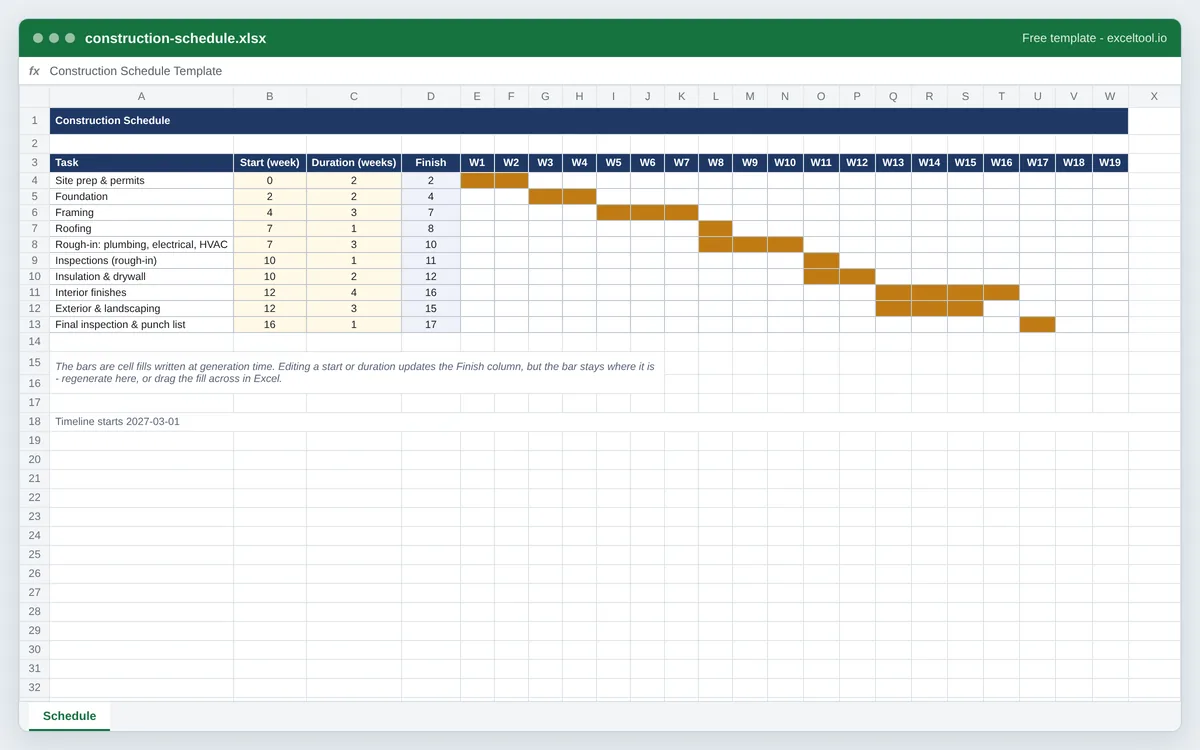
A construction schedule in Excel: each phase of the build as a bar on a week-by-week timeline, with start, duration and finish columns you can edit.
Free download - no sign-up, no email
construction-schedule.xlsx
- Ten typical phases of a residential build, from site prep and permits to the final inspection and punch list.
- A week-by-week timeline counted from your start date, so the chart shows when each phase runs.
- Start, duration and finish columns for every phase; Finish is a live formula.
Planning something that is not a build? The Gantt chart template starts from a blank project.
Opens in Excel, Google Sheets, Numbers and LibreOfficeBuilt in your browser · nothing uploaded
Options
Day 0 of the timeline.
One per line: phase | start week | duration in weeks.
| A | B | C | D | E | F | G | H | I | |
|---|---|---|---|---|---|---|---|---|---|
| 1 | Construction Schedule | ||||||||
| 2 | |||||||||
| 3 | Task | Start (week) | Duration (weeks) | Finish | W1 | W2 | W3 | W4 | W5 |
| 4 | Site prep & permits | 0 | 2 | =B4+C4 | |||||
| 5 | Foundation | 2 | 2 | =B5+C5 | |||||
| 6 | Framing | 4 | 3 | =B6+C6 | |||||
| 7 | Roofing | 7 | 1 | =B7+C7 | |||||
| 8 | Rough-in: plumbing, electrical, HVAC | 7 | 3 | =B8+C8 | |||||
| 9 | Inspections (rough-in) | 10 | 1 | =B9+C9 | |||||
| 10 | Insulation & drywall | 10 | 2 | =B10+C10 | |||||
| 11 | Interior finishes | 12 | 4 | =B11+C11 | |||||
| 12 | Exterior & landscaping | 12 | 3 | =B12+C12 | |||||
| 13 | Final inspection & punch list | 16 | 1 | =B13+C13 | |||||
| 14 | |||||||||
| 15 | The bars are cell fills written at generation time. Editing a start or duration updates the Finish column, but the bar stays where it is - regenerate here, or drag the fill across in Excel. | ||||||||
| 16 | |||||||||
| 17 | |||||||||
| 18 | Timeline starts 2027-03-01 | ||||||||
| 19 | |||||||||
| 20 | |||||||||
| 21 | |||||||||
| 22 |
Preview of the first 22 rows. Cells shown as =SUM(...) are live formulas in the downloaded workbook, not pasted numbers.
Built in your browser · nothing uploadedconstruction-schedule.xlsx · 1 sheetOpens in Excel, Google Sheets, Numbers and LibreOffice
What you get
- Ten typical phases of a residential build, from site prep and permits to the final inspection and punch list.
- A week-by-week timeline counted from your start date, so the chart shows when each phase runs.
- Start, duration and finish columns for every phase; Finish is a live formula.
- Your own phases: type one per line before you download.
Other templates
About this template
A construction schedule shows the order of a build and how long each stage takes, so the owner, the trades and the lender can see where the job should be in any given week. On a small project it is usually a Gantt chart: one row per phase, a bar across the weeks it runs.
This template starts with ten phases most residential builds and remodels go through: site prep and permits, foundation, framing, roofing, rough-in for plumbing, electrical and HVAC, the rough-in inspection, insulation and drywall, interior finishes, exterior work and landscaping, and the final inspection with the punch list. Overlapping bars show work that can run at the same time, such as roofing during rough-in.
The durations are a starting point, not a promise. Weather, inspections and lead times on windows or cabinets move real schedules, so replace them with your own numbers and regenerate when the plan changes.
How to use it
- Set the start date - Enter the date work starts on site. The timeline header counts weeks from that date.
- List your phases - One per line as phase | start week | duration in weeks, where week 0 is the first week. Keep phases that overlap in the trade's real order.
- Download - Get the Excel file to keep editing, or the PDF to print and pin up in the site office or send to the client.
- Update the plan - Change a start or duration in Excel and the Finish column recalculates. To move the bars, regenerate here with the new numbers.
Formulas in this workbook
Every formula below is written into the workbook itself, exactly as shown. The cell references are the ones the default options produce; change the row or column counts and they shift to match.
=B4+C4- Finish week on each phase: the start week plus the duration. Site prep starting in week 0 and lasting 2 weeks finishes at 2, which is when the foundation can start.
Customizing it
- Switch the timeline to days for a short remodel, such as a two-week kitchen or bathroom job.
- Add a phase for long-lead items, like ordering windows or cabinets, so it shows up weeks before the trade needs them.
- Color the bars by trade in Excel with Home > Fill Color.
- Add a column for the responsible subcontractor next to each phase.
Frequently Asked Questions
It varies a lot with the size of the house, the region, permits, weather and how fast materials arrive; many single-family homes take somewhere between several months and a year from breaking ground. The default schedule here is 17 weeks of site work for a simple build, so replace the durations with your builder's own estimates.
Typically site prep and permits, foundation, framing, roofing and windows to dry the building in, rough-in for plumbing, electrical and HVAC, a rough-in inspection, insulation, drywall, interior finishes, exterior work, and a final inspection before the certificate of occupancy.
A Gantt chart is one way to draw a schedule. Larger commercial jobs often use the critical path method in scheduling software, but for homes and small commercial work a Gantt chart in Excel is the common choice because everyone can read it.
Yes. Download the PDF for a fixed copy, or upload the .xlsx to Google Sheets or OneDrive and share the link so the client always sees the latest version.