SOP Template - Free Standard Operating Procedure in Excel and PDF
A standard operating procedure template with a document control block, purpose, scope and safety sections, numbered steps with who does each one, and a revision history.
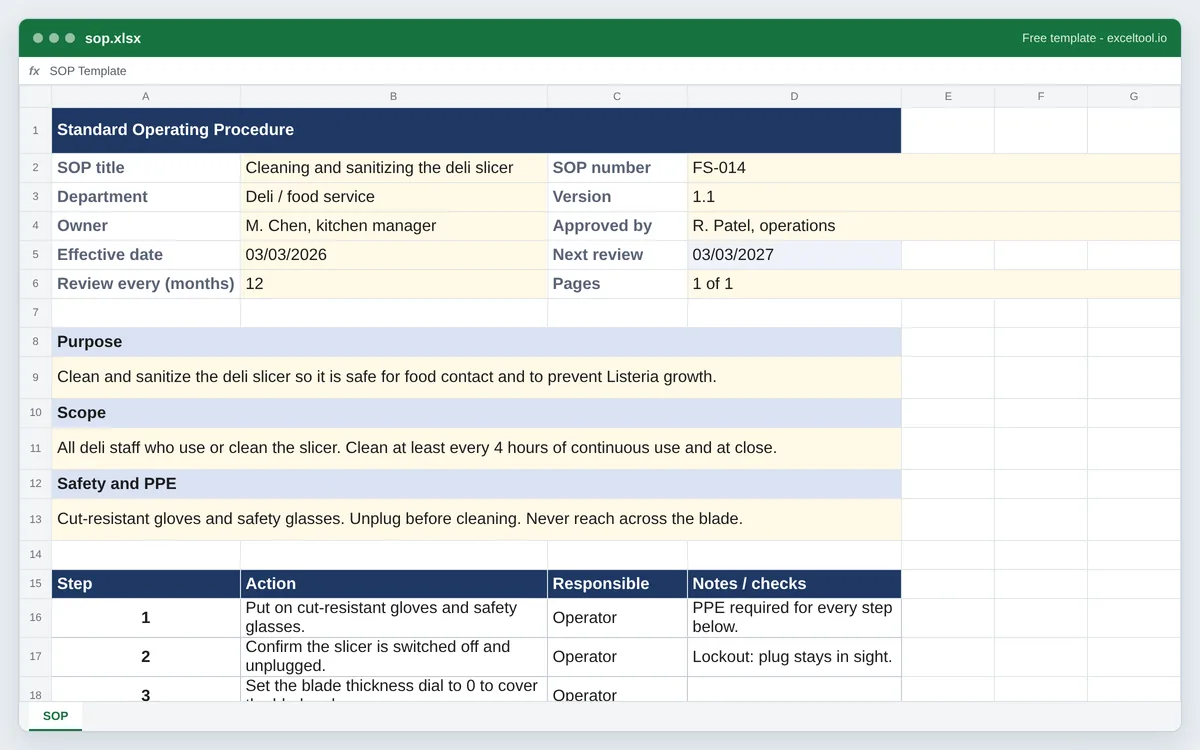
- A control block with SOP number, version, department, owner, approver and effective date.
- A next review date worked out from the effective date and the review interval.
- Purpose, scope and safety boxes, then a numbered steps table with who is responsible and notes.
Training people on it? Track who has signed off with the sign-in sheet template.
Opens in Excel, Google Sheets, Numbers and LibreOfficeBuilt in your browser · nothing uploaded
Options
Shows how the sheet works. Type over them or delete them.
| A | B | C | D | |
|---|---|---|---|---|
| 1 | Standard Operating Procedure | |||
| 2 | SOP title | Cleaning and sanitizing the deli slicer | SOP number | FS-014 |
| 3 | Department | Deli / food service | Version | 1.1 |
| 4 | Owner | M. Chen, kitchen manager | Approved by | R. Patel, operations |
| 5 | Effective date | 03/03/2026 | Next review | =IF(COUNT(B5,B6)=2,EDATE(B5,B6),"") |
| 6 | Review every (months) | 12 | Pages | 1 of 1 |
| 7 | ||||
| 8 | Purpose | |||
| 9 | Clean and sanitize the deli slicer so it is safe for food contact and to prevent Listeria growth. | |||
| 10 | Scope | |||
| 11 | All deli staff who use or clean the slicer. Clean at least every 4 hours of continuous use and at close. | |||
| 12 | Safety and PPE | |||
| 13 | Cut-resistant gloves and safety glasses. Unplug before cleaning. Never reach across the blade. | |||
| 14 | ||||
| 15 | Step | Action | Responsible | Notes / checks |
| 16 | 1 | Put on cut-resistant gloves and safety glasses. | Operator | PPE required for every step below. |
| 17 | 2 | Confirm the slicer is switched off and unplugged. | Operator | Lockout: plug stays in sight. |
| 18 | 3 | Set the blade thickness dial to 0 to cover the blade edge. | Operator | |
| 19 | 4 | Remove the product tray and the blade guard. | Operator | Lift straight up; do not twist. |
| 20 | 5 | Wash removed parts in the three-compartment sink: wash, rinse, sanitize. | Operator | Sanitizer at 200 ppm quat; check with test strip. |
| 21 | 6 | Wipe the blade from the center outward with a cloth on a cleaning wand. | Operator | Never wipe toward the edge by hand. |
| 22 | 7 | Sanitize all food-contact surfaces and let them air-dry. | Operator | Do not towel dry. |
Preview of the first 22 rows. Cells shown as =SUM(...) are live formulas in the downloaded workbook, not pasted numbers.
Built in your browser · nothing uploadedsop.xlsx · 1 sheetOpens in Excel, Google Sheets, Numbers and LibreOffice
What you get
- A control block with SOP number, version, department, owner, approver and effective date.
- A next review date worked out from the effective date and the review interval.
- Purpose, scope and safety boxes, then a numbered steps table with who is responsible and notes.
- A revision history so readers can see what changed and when.
Other templates
About this template
A standard operating procedure (SOP) writes down the one agreed way to do a task, so it gets done the same way by every person on every shift. Restaurants use them for cleaning and food safety, warehouses for receiving and forklift checks, clinics and labs for anything an inspector will ask about, and offices for onboarding and month-end close.
This template follows the layout most quality systems expect. The top block is document control: the SOP number, title, department, version, owner, who approved it, and the effective date. Enter how often it must be reviewed and the next review date fills itself in. Below that are short boxes for the purpose, the scope (who and what it covers) and safety or PPE notes, then the procedure itself as numbered steps with the role responsible for each. The revision history at the bottom records every change.
The example is a deli slicer cleaning procedure, because short, concrete steps are what make an SOP usable. Replace it with your own task, one action per step.
How to use it
- Choose the size - Set how many steps and revision lines you need and whether to keep the example, then download Excel or the PDF.
- Fill in document control - Give the SOP a number and title, the department and owner, the version and the effective date. Enter the review interval in months.
- Write purpose, scope and safety - One or two sentences each: why the procedure exists, which people, sites or equipment it covers, and the PPE or hazards to know before starting.
- Write the steps - One action per step, in the order it is done, starting with a verb. Put the role, not the person's name, in Responsible so the SOP survives staff changes.
- Approve and log it - Have the approver sign off, add a line to the revision history, and bump the version each time the steps change.
Formulas in this workbook
Every formula below is written into the workbook itself, exactly as shown. The cell references are the ones the default options produce; change the row or column counts and they shift to match.
=IF(COUNT(B5,B6)=2,EDATE(B5,B6),"")- Next review date: the effective date moved forward by the review interval in months. EDATE keeps the same day of the month, so an SOP effective March 3 with a 12-month interval is due for review on March 3 the next year. It stays blank until both cells are filled.=COUNTA(B16:B25)- Counts the steps that have an action written in, so you can see the length of the procedure at a glance.
Customizing it
- Add a column for a photo or diagram reference next to steps that are easier to show than describe.
- For regulated work, add rows to the control block for the regulation or standard the SOP satisfies.
- Add a training sign-off sheet: a second tab with name, date trained and trainer for each person who must follow the SOP.
- Change the review interval to match your policy; 12 months is common, high-risk procedures are often reviewed more often.
Frequently Asked Questions
At minimum: a title and number, the purpose, the scope, who is responsible, any safety requirements, the step-by-step procedure, and document control details such as version, effective date, approver and revision history.
Watch someone do the task, write one action per step in the order it happens, start each step with a verb, and test the draft by having someone new follow it without help. Anything they get stuck on needs another step or a note.
Most organizations review SOPs every one to three years, and straight away when equipment, regulations or the process change. Set the interval in this template and it shows the next review date.
The template is a spreadsheet, which keeps steps and revisions in tidy tables. Open the .xlsx in Excel or Google Sheets, or download the PDF to print. You can paste the steps table into a Word document if your system requires one.